Cypress vs Selenium: Inside the Browser or Outside It?
Cypress and Selenium differ in where tests run, which fixes your languages, browsers and waiting. Compare both on cost and migration, then pick for your team.

Cypress runs your test code inside the browser, in the same run loop as your app. Selenium runs it in a separate process and sends each command to the browser through a driver. The placement fixes your languages. It fixes your browsers. It also decides who has to think about waiting.
Most comparisons list those differences and stop. This one prices them, so a JavaScript team and a Java team can each leave with an answer.
What you’ll learn
- Where each tool runs your test, and what that placement costs you
- How languages, browsers, waiting and cost compare on current versions
- Which team each tool fits, in a decision table
- How to move a test between them, shown on one login flow that ran in both
Quick Answer: Cypress or Selenium?
Pick Cypress if your team writes JavaScript or TypeScript and nobody needs real Safari. It waits for you, debugs inside the browser and installs with one npm command. Pick Selenium if the tests must be written in Java, Python, C# or Ruby, or if your release criteria name real Safari. It is the only one of the two that can do those jobs. If neither applies, start with Cypress.
Cypress vs Selenium at a Glance
| Dimension | Cypress | Selenium |
|---|---|---|
| Where the test runs | Inside the browser, in the app’s run loop, with a Node.js process behind it | In a separate process that sends commands to a browser driver |
| Languages | JavaScript and TypeScript | Java, Python, C#, Ruby, JavaScript |
| Browsers | Chrome-family (Chrome, Edge), Firefox, experimental WebKit | Chrome, Edge, Firefox, Safari |
| Real Safari | No | Yes, through safaridriver on macOS |
| Tabs and windows | One browser at a time, extra tabs through a plugin | Built in |
| Waiting | Queries and assertions retry on their own | You write explicit or implicit waits |
| Parallel runs | —parallel through Cypress Cloud, or a community splitter | Selenium Grid on your machines, or a cloud grid |
| Cost to start | Free app (MIT), free Cloud plan with 500 results a month | Free (Apache-2.0) |
| Native mobile apps | No | No, Appium is the separate project for that |
What Is Cypress?
Cypress is an open-source end-to-end testing framework for the web. The current release is 16.2.1 (October 28, 2026), and the app is MIT-licensed. It needs Node.js 22, 24 or 26 and later. Cypress’s docs state plainly that its architecture does not use Selenium or WebDriver.
You write specs in JavaScript or TypeScript with a chained API such as cy.get('[data-testid=email]').type('user@example.com'). The Cypress app opens a real browser and snapshots the page at every command, so you can time-travel back through a failed step. It also ships component testing for React, Angular and Vue. Cypress Cloud is the hosted companion for recorded runs and parallelization.
What Is Selenium?
Selenium is an open-source browser-automation project. Jason Huggins started it at ThoughtWorks in 2004, and the current release is 4.52.0 (October 29, 2026) under the Apache-2.0 licence. WebDriver is the part you write tests against. It pairs language bindings for Java, Python, C#, Ruby and JavaScript with a driver for each browser. The two speak the W3C WebDriver standard, a W3C Recommendation since 2018.
WebDriver BiDi extends that standard with two-way communication over a WebSocket, and it is still a Working Draft (October 8, 2026). Selenium’s docs call its Chrome DevTools support temporary until BiDi is implemented.
Setup has gotten easier than its reputation. Since 4.6, Selenium Manager ships in every release and downloads the driver a script needs, and from 4.11 it also fetches browsers, starting with Chrome. The cost moved elsewhere. Selenium gives you bindings and drivers, and the rest is yours to assemble:
- Runner and assertions: Pick a framework such as Mocha, JUnit or pytest.
- Reports: Add your own.
- Parallel runs: Run the machines yourself, on Selenium Grid or a cloud grid.
Cypress vs Selenium: 5 Key Differences
1. Where the Test Runs
Cypress executes test code in the browser, in the same run loop as the app. A Node.js process behind it communicates with the browser constantly and performs tasks on its behalf. Selenium keeps the test in its own process. Each command goes through a language binding to a browser driver, which operates the browser and reports back.
Cypress is almost like a tester sitting inside the page, working alongside the app. Selenium is a tester dictating over the phone to someone at the keyboard. Each instruction is spoken, carried out and confirmed before the next one goes. Between instructions Selenium cannot see the page, so it needs you to say when to wait.
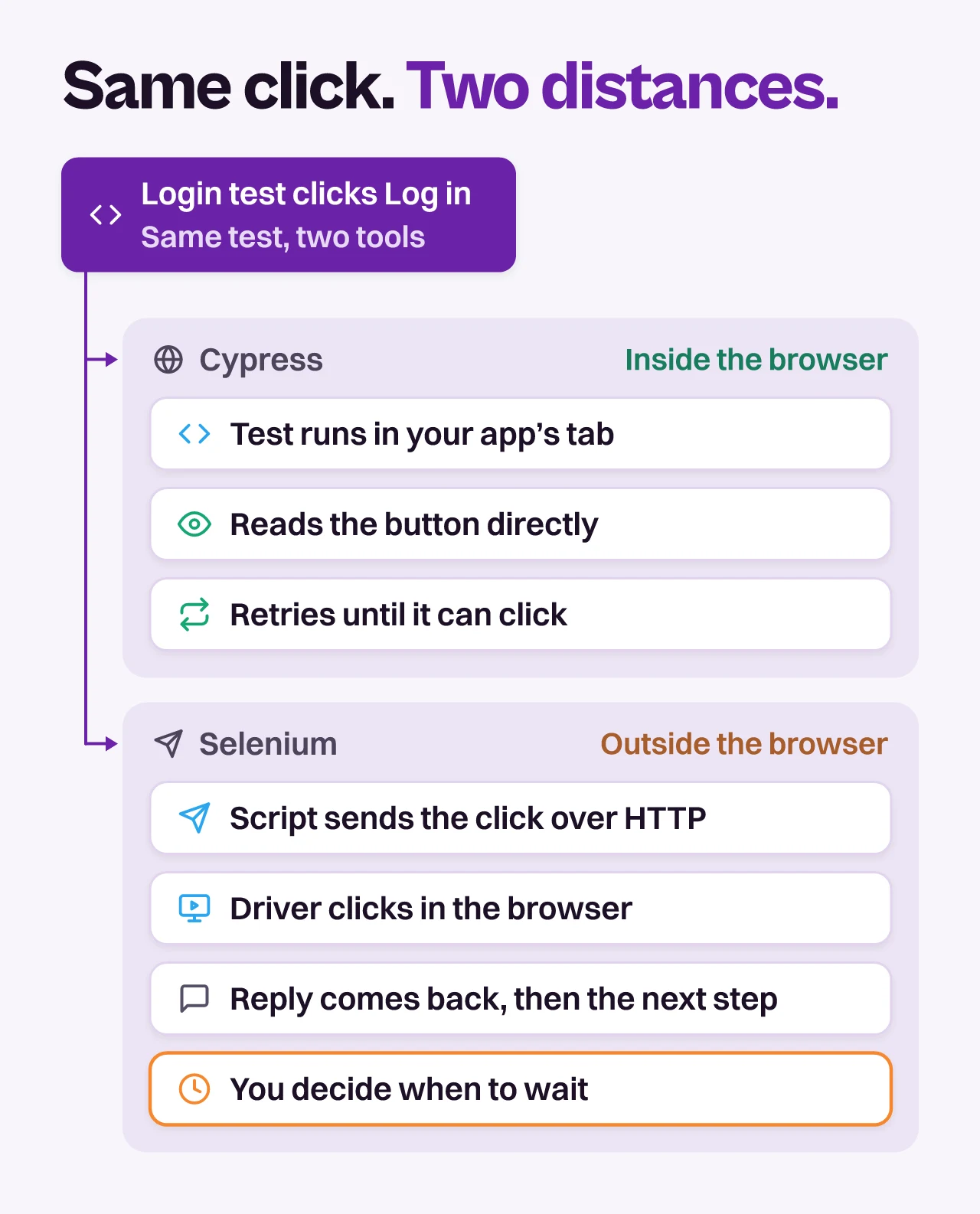
- Inside the browser (Cypress): Waiting can be built in. The price is a set of trade-offs that Cypress’s own docs spell out, and the next two sections cover them.
- Outside the browser (Selenium): Any browser with a driver can be driven from any of five language bindings, and windows and tabs are native. The price is distance. The test learns about the page only by asking, so waiting becomes a decision you make.
The designs are converging at the edges. Cypress 15 made WebDriver BiDi the only way it automates Firefox, the standard Selenium is moving its own implementation to. Cypress 16.0.0 (September 1, 2026) then switched Chrome, Chromium and Edge to intercepting test traffic on the browser’s own network layer instead of routing it through Cypress. Neither change moves the test out of the browser.
Cypress sees more of the page. Selenium reaches more of the world.
2. Languages: Who Maintains
Cypress’s trade-offs page says the only language it will ever support is JavaScript, and TypeScript works through official type declarations. Selenium’s official bindings cover Java, Python, C#, Ruby and JavaScript. Language is a staffing decision before it is a technical one, and it splits three ways.
- JavaScript or TypeScript team: Cypress specs live in the app’s repo and use the tooling the developers already know, and component tests sit beside them.
- QA team in Java, Python or C#: Selenium lets them keep their language, their runner and their review habits. Cypress would give the one team that maintains the suite a second language to learn.
- Mixed team: Pick the language of whoever maintains the suite, not whoever wrote the app.
Selenium, unless the people who maintain your tests already write JavaScript.
3. Reach: Browsers, Tabs, and Frames
Cypress runs Chrome-family browsers (Chrome, Edge and Chrome for Testing), Firefox and WebKit. WebKit is Safari’s engine, not Safari, and Cypress still labels the support experimental. You switch it on with experimentalWebKitSupport: true and the playwright-webkit package. Cypress’s docs present WebKit testing as the practical way to check how your app behaves in Safari, so a team that needs the engine but not the app itself can start there. Electron has been deprecated as a test browser since 16.0.0 and will be removed in a future version.
Selenium drives Chrome, Edge, Firefox and Safari. Its safaridriver ships with macOS and controls the real browser, so a requirement that says “test on Safari” is a Selenium requirement.
Standalone Internet Explorer is gone from both lists. Selenium’s docs say it stopped officially supporting it in June 2022, and only Edge’s IE mode remains. Four limits matter more than the browser list:
- Tabs and windows: Cypress does not control more than one open browser at a time, though the
@cypress/puppeteerplugin lets you test multiple tabs. Selenium switches windows and tabs natively. - Cross-origin flows: Each Cypress test is bound to a single superdomain unless it uses
cy.origin(), and that block cannot run commands in another tab, window or iframe. - Frames: Cypress’s docs call iframe support somewhat limited, but it works. The iframe issue has been open on GitHub since 2016 with more than 800 thumbs-up. Selenium switches into a frame with
switchTo().frame(). - Native apps: Neither tool drives them. Cypress’s docs list no native or mobile events support, and Selenium automates web browsers and points iOS Safari automation to Appium.
Selenium takes this one, for real Safari and for flows that open several windows.
4. Speed and Flakiness: Who Waits
The usual claim is that Cypress is faster because it runs in the browser. The architecture decides less of that than the claim suggests.
- Per command: A Cypress command that acts on the page runs in the browser, so it does not cross a process boundary to reach it. A Selenium command does, and its answer comes back before the next command goes out.
- Per suite: Wall-clock time is set by how the suite is split across machines and how many tests sit waiting on slow pages, so the per-command gap rarely decides it. Treat any “N times faster” figure that omits its hardware, its app and its versions as marketing.
Flakiness is where the placement shows. Cypress retries queries and assertions until they pass or time out. A command that changes state, such as .click(), runs once, after Cypress waits for the element to be actionable. In Selenium, waiting is yours. The docs call the race between the browser and the script one of the primary causes of flaky tests, and they warn against mixing implicit and explicit waits.
We built the smallest case that shows the difference. On our test page, the message “Welcome back” appears 1,500 ms after the login form submits. Here is the Cypress 16.2.1 spec. Its config sets baseUrl, and it needs supportFile: false too, because run mode fails in a project that has no support file:
describe('login', () => {
  it('shows the welcome message', () => {
    cy.visit('/');
    cy.get('[data-testid=email]').type('user@example.com');
    cy.get('[data-testid=password]').type('hunter2');
    cy.get('[data-testid=submit]').click();
    cy.get('[data-testid=welcome]').should('contain', 'Welcome back');
  });
});
Here is the same flow in Selenium 4.52.0 with the JavaScript binding. It runs Chrome 155 headless.
const { Builder, By, until } = require('selenium-webdriver');
const chrome = require('selenium-webdriver/chrome');

const byTestId = (id) => By.css(`[data-testid=${id}]`);

(async () => {
  const options = new chrome.Options().addArguments('--headless=new');
  const driver = await new Builder()
    .forBrowser('chrome')
    .setChromeOptions(options)
    .build();
  try {
    await driver.get('http://localhost:8765/');
    await driver.findElement(byTestId('email')).sendKeys('user@example.com');
    await driver.findElement(byTestId('password')).sendKeys('hunter2');
    await driver.findElement(byTestId('submit')).click();

    const locator = byTestId('welcome');
    const welcome = await driver.wait(until.elementLocated(locator), 5000);
    console.log(await welcome.getText());
  } finally {
    await driver.quit();
  }
})();
Three runs, one machine:
- Cypress, no wait written: Passes with
1 passing. The lastcy.getkeeps retrying until the message appears or its timeout runs out. ThedefaultCommandTimeoutsetting defaults to 4,000 ms, so a message that arrives later needs a longer timeout. - Selenium, wait removed: Fails at once with
NoSuchElementError: no such element: Unable to locate element. Replace thedriver.wait(...)line with a plaindriver.findElement(...)and the lookup happens before the page has rendered the message. - Selenium, explicit wait as above: Passes.
The Selenium script has no assertion of its own, which is the other half of the assembly cost. In a real suite that last line belongs to a test runner such as Mocha, JUnit or pytest.
Cypress is steadier out of the box. On speed, call it a tie.
5. Cost and Maintenance: Who Pays
Both tools are free to download. The Cypress app is MIT-licensed and Selenium is Apache-2.0. The bill arrives later, in different places.
- Cypress Cloud:
--parallelrequires--record, which sends results to Cypress Cloud. The Starter plan is free with 500 test results a month. Team starts at $799 a year and Business at $3,199 a year on annual billing, and Enterprise is custom. Parallelization is included in all four. Eachit()call is one test result, and a retry adds nothing. - Community splitters: Cypress’s plugin list includes cypress-split and cypress-load-balancer, which split specs across parallel CI machines. The cypress-split README says it needs no external service. Both are community plugins that Cypress does not review, so check each one’s releases before you rely on it.
- Selenium Grid: There is nothing to license. Grid runs standalone, as a hub with nodes, or fully distributed across machines. You pay in those machines, in upgrades and in whoever owns the infrastructure.
Cypress’s meter counts test results. Take a 100-test suite recorded on every CI run. The free plan covers five runs a month. Team includes 120,000 results a year, per Cypress’s pricing page. That covers 1,200 runs, about five a working day.
Neither meter includes the larger cost, which is the hours spent keeping the suite green. A prospect who runs the Cypress suite before each redeploy described it to us as small and very brittle, with some manual testing on top for every release.
Cypress meters results. Selenium meters your time.
Which One Should You Choose?
Find the first row that describes your team and the pick follows. If Playwright has joined your shortlist, our three-way comparison of Cypress, Selenium and Playwright adds it to this one.
| If this is true | Pick | The catch |
|---|---|---|
| Your team writes JavaScript or TypeScript for a web app | Cypress | No real Safari, one browser at a time |
| Your QA engineers write Java, Python or C# | Selenium | You assemble the runner, reporting and parallel runs |
| Your release criteria say real Safari | Selenium | Your pipeline needs macOS machines |
| Your flows open several tabs or windows | Selenium | Waiting for each window is yours to write |
| You want parallel runs on your own hardware with no per-result meter | Selenium Grid, or Cypress with a community splitter | You operate the machines |
| You test components beside a React, Angular or Vue app | Cypress | Only for the frameworks it mounts |
| A Selenium suite is already green and owned | Keep it | Migrate when a hard limit bites, not for fashion |
Choose Cypress If
- The people who write the app also write the tests, and they work in JavaScript or TypeScript
- You want waiting, debugging and setup to be someone else’s solved problem
- Your users’ browsers are Chrome-family or Firefox, and Safari is a nice-to-have
Choose Selenium If
- A QA team that is not a JavaScript team owns the suite
- Real Safari, several windows or your own Grid are requirements
- You already have a Selenium suite that works and has an owner
How to Move Tests Between Them
A move between these two is smaller than it looks, because CSS selectors port and the waiting does not. The [data-testid=email] string worked unchanged in both runs above.
| Step | Cypress | Selenium (JavaScript) |
|---|---|---|
| Open the page | cy.visit('/') | await driver.get(url) |
| Find and type | cy.get(sel).type(text) | await driver |
| Wait for the result | Built in, the next cy.get retries | await driver |
| Assert | .should('contain', text) | Your test runner’s assertion |
Four rules keep a migration from stalling. They hold in both directions.
- Port the selectors first: Copy the CSS strings across and leave them alone. Every locator you change during a move is a failure you will blame on the move.
- Rewrite the waiting: Moving to Cypress, delete the sleeps and explicit waits and let assertions retry. Moving to Selenium, add explicit waits and skip the implicit one.
- Move by flow: Run the old and new versions of one flow side by side until the new one has gone green on several CI runs, then delete the old.
- Leave hard limits where they are: A suite can route by case, with Cypress for most flows and Selenium for the Safari ones.
What Neither Tool Changes
The placement settles languages, browsers and waiting. Three things stay the same whichever you pick.
- Selectors bind the test to the DOM.
[data-testid=submit]is the same string incy.getand inBy.css. Rename it and both suites go red while the app still works. - You write every test. In JavaScript or in Java, a person on your team authors each one.
- You fix what breaks. Retries and waits cut the timing kind of flake. The kind caused by a selector that stopped matching still needs a person, as our guide to flaky tests covers.
Draft the Login Test in Pie With One Sentence
The login test above took two specs, one for each tool. In Pie Chat it takes one sentence. You describe the check, such as “a user logs in and sees Welcome back”, and Pie explores the flow and drafts the test case. You select Create test case once the draft reads right, and Pie runs it straight away.
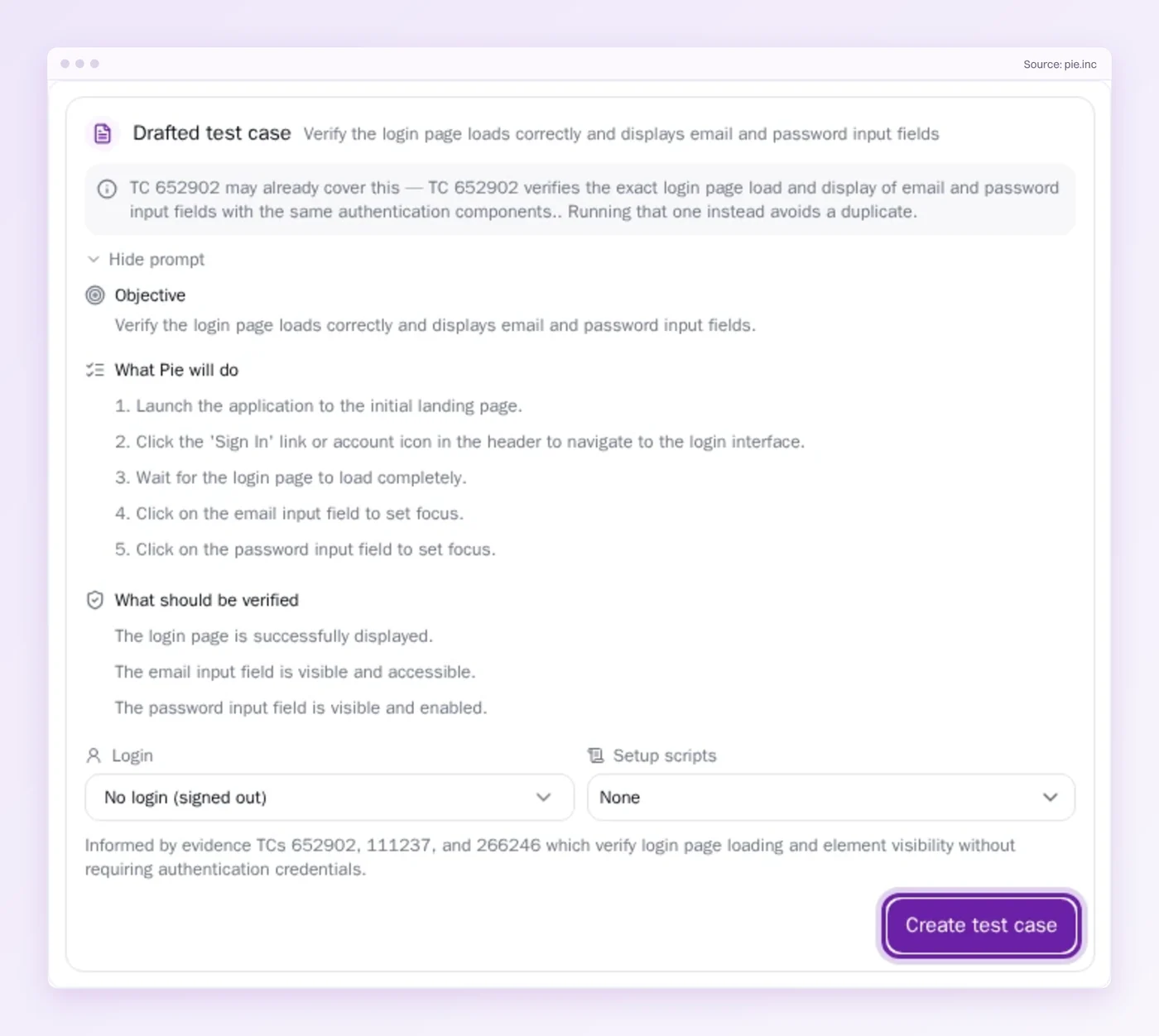
- No selectors to maintain: For supported tests, nobody on your team writes or maintains them, which is the upkeep Cypress and Selenium both leave with you.
- Edit with AI: When a flow changes on purpose, start from Fix this testcase and Pie drafts the change. It stays in your draft until you save.
- Web, iOS and Android: The same test logic runs on all three. Cypress stops at the browser, and Selenium points to Appium for apps.
- Beside your suite: Pie augments what you have. Keep Cypress or Selenium for the flows that need code-level control, and let Pie take the ones nobody has time to script.
Pick by Constraint, Not Speed
Both tools are good at the placement they chose. Take the one whose limits your release criteria can live with. Language and real Safari are where those limits bite first.
Then look at what the choice leaves open. A green Cypress suite and a green Selenium suite both run on selectors, so both need someone to keep them green after the next redesign.
Skip the Rewrite. Skip the Selectors.
Describe your login check in one sentence, then review the test case Pie drafts.
Frequently Asked Questions
Neither wins in the abstract. Cypress suits a JavaScript or TypeScript team testing a web app, with waiting, debugging and setup built in.
Selenium suits teams that write Java, Python, C# or Ruby, or that must test real Safari.
No. Cypress's docs say its architecture does not use Selenium or WebDriver, so it is a separate tool and not a wrapper around Selenium.
Cypress tests run in the browser. Selenium sends commands to a driver from outside it.
Per command, Cypress skips a process hop that Selenium pays. Per suite, the gap mostly disappears, because total time depends on how tests are split across machines and how many wait on slow pages.
Time both on your own app, each one parallelized.
Only partly. Cypress supports WebKit, Safari's engine, as an experimental feature you switch on with a config flag and the playwright-webkit package.
It does not drive the real Safari app. Selenium does, through safaridriver on macOS.
Not in core. Cypress does not control more than one open browser at a time, but the @cypress/puppeteer plugin lets you test multiple tabs.
A single test can visit several origins with cy.origin. Selenium switches between windows and tabs natively.
Yes. Selenium 4.52.0 shipped on October 29, 2026, the WebDriver standard it implements is a W3C Recommendation, and five languages have official bindings.
Its direction is clear too, with Selenium moving its implementation to WebDriver BiDi.
The Cypress app is open source under the MIT licence. Parallel runs need Cypress Cloud, whose free Starter plan includes 500 test results a month.
Team starts at $799 a year and Business at $3,199 a year on annual billing.
Pie sits beside your suite rather than replacing it. You describe a check in Pie Chat and Pie drafts the test case for you to review.
Cypress or Selenium stay for flows that need code-level control. Pie takes the ones nobody has time to script.
Eight years building search and delivery systems at Amazon. The kind of scale where flaky tests block billion-dollar releases. Now CTO at Pie, building AI agents that adapt when your UI changes. LinkedIn →