Manual vs Automated Testing: Where Each One Wins in 2026
Checks that run often and change often break both manual and scripted testing. See where each approach wins and a one-line rule for placing every check.

A mobile team told us their manual regression pass takes one person about a week. Every release, the same checks, clicked through by hand. If your team tests by hand before each release, some version of that week is on your calendar.
Part of that week needs a human. The rest is the same walk through the same screens. Here is a one-line rule for sorting your own checks into each pile.
What you’ll learn
- Where manual testing beats automation, and where it gets expensive
- What scripted automation does well and the cost it hides
- A one-line rule for deciding which checks stay with a person
- What to do with the checks that run often and keep changing
Manual vs Automated Testing at a Glance
Manual testing is a person running a check step by step. Automated testing is a script running it the same way every time. People win where judgment decides the result, and scripts win where the same check runs again and again. Neither wins on both. The useful question is which checks go where.
| Dimension | Manual Testing | Automated Testing |
|---|---|---|
| Who runs it | A tester, step by step | A script, on a schedule or every build |
| Best at | Usability, exploration, new features, acceptance | Regression, smoke checks, large data sets, device matrices |
| Cost to start | Low, nothing to write | High, someone writes and debugs the script |
| Cost to keep | Paid again in tester time on every run | Paid when the screen changes and the script breaks |
| Speed | Limited by the hours a person has | Parallel, at any hour |
| Consistency | Varies, because people tire and skip steps | Identical on every run |
| Biggest risk | The regression pass eats the week | Maintenance eats the gains |
What Manual Testing Does Best
Some checks need a person’s eyes and a person’s judgment, and a script supplies neither. Usability is the clearest case. A script confirms that a button exists and responds to a click. It cannot tell you that the button sits where nobody will look for it, or that the copy above it reads wrong in context.
Exploratory testing is the other job worth protecting. A tester follows a hunch into a corner that no written path reaches, and that is where the bugs a scripted suite never asks about tend to turn up. Features that are mid-build belong to people too. If the expected behavior changes every few days, a script written today gets rewritten next week. The final call on whether something does what the business asked is also a human one, and user acceptance testing exists for exactly that.
Where Manual Testing Gets Expensive
Manual testing costs the same on every run. A tester runs the check and judges the result, then does it all again next release. Nothing about the tenth run is cheaper than the first, and by then steps start getting skipped.
The deeper cost is what the repeats crowd out. When a regression pass takes a week, exploration happens in whatever hours are left over. The work that needs a curious person gets the least of one. Manual testing is strongest on the work that does not repeat, and a repeated pass pushes that work aside first.
Manual Testing on Mobile
On a phone, the gap between a script and a person widens. A tester holding the device notices a keyboard covering the Pay button and a permission prompt that arrives at the wrong moment. Those are judgment calls about feel. The repeated checks around them are a different job, and our guide on how to test a mobile app covers the device and OS matrix in full.
What Automated Testing Does Best
Automation earns its cost on checks with one clear expected result that run often against a stable screen. Run one of those many times and each extra run costs close to nothing.
Where Automation Pays Off
- Regression: A regression test suite re-checks that existing features work after every change, which makes it the strongest case.
- Smoke checks: An obvious break gets caught on every build, before it reaches the next developer.
- Large data sets: Hundreds of input combinations run without anyone sitting through them.
- Device and browser matrices: A grid too big to click through by hand can run overnight.
- Load and performance: Simulating thousands of users at once is work only tools can do.
If you ship daily, a manual regression pass cannot keep up, and test automation in practice means taking that pass off people. The test pyramid shows the same economics by layer. In Martin Fowler’s write-up, tests that run through the UI are brittle, expensive to write and slow to run. The pyramid asks for many more unit tests underneath. Automate the stable layers heavily and treat the UI layer with care.
Where Automation Gets Expensive
“Cheap to repeat” holds only while the screen stays put. A Selenium, Cypress or Playwright script finds each element by something written into the page, such as an ID, a CSS class or a button’s label. When a designer renames one of those, the check fails even though the feature works. Someone spends the afternoon repairing the script instead of testing anything new.
Suites built this way also grow flaky tests that fail at random and teach people to ignore a red build. The more often your team ships UI changes, the sooner a script’s saved time turns into repair time. Even the best scripted test automation tools shrink that cost without removing it.
Where Automation Cannot See
A script checks what it was told to check and nothing else. A misspelled heading on the page next to the one under test passes every run, because nobody wrote a step for it. The suite stays green while the product carries a bug a visitor would spot in seconds. This is the quiet limit of scripted automation, and it is why exploratory work keeps its value on teams with large suites.
How to Decide Which Checks Stay Manual
Every check can go to a person or a machine, and two questions place it. How often does it need to run, and how often does the screen it touches change?
Script a check when the hand-testing time it saves before its screen changes is more than the time to write and repair it.
| Runs often? | Screen changes often? | Who should own it | Why |
|---|---|---|---|
| Yes | No | A script | Written once, repaid on every run |
| No | No | A person, or a script if a miss would be costly | A few runs rarely repay a script, unless the check guards something that must not break |
| No | Yes | A person | The script would be rewritten before it paid for itself |
| Yes | Yes | Neither does it well | Scripts break every sprint, and a person re-running the check pays for it again every release |
The bottom row is the expensive one, and it is where the core flows of a fast-moving product sit. Checkout and the flows around it run on every release, and the screens keep changing. To see what that bottom row costs your team, our savings calculator turns your weekly testing and maintenance hours into a yearly figure.
Before you hand it to anyone, move what you can down a layer. Checkout’s pricing and payment rules belong in API tests that never look at the screen. What is left is the walk through the screens, and that walk is the bottom row.
Manual regression is the first thing to hand off. Manual exploration is the thing to protect.
The Rule Applied to Four Checks
- Login on every build: It runs constantly on a screen that rarely changes, so a script repays itself fast.
- Quiet settings page: Nobody has touched it in a year and it rarely runs. A person can check it by hand each quarter.
- Onboarding in redesign: The screen changes weekly and the check runs only now and then. Keep it manual until the design settles.
- Fast-moving checkout: It runs on every release while the screens around it keep moving, which puts it in the bottom row.
Placement changes as the product does. A screen that settles can move from a person to a script, and a script that breaks every sprint drops back to the bottom row.
Describe a Manual Check and Pie Drafts the Test
The bottom row is where a third layer earns its place. Autonomous testing hands the writing and repair of scripts to AI agents. Scripts run the checks someone wrote. Agents write them and keep them current.
A tester on a team shipping two or three releases a day told our team that API changes went through automation. The booking and payment flows were checked by hand around every release, and release checks took most of their time. That left little room for hunting bugs already in the product. An agent can take that pass.
Your manual test cases are already written in plain English, and plain English is what Pie takes as input. A tester who can describe a check can start a test.
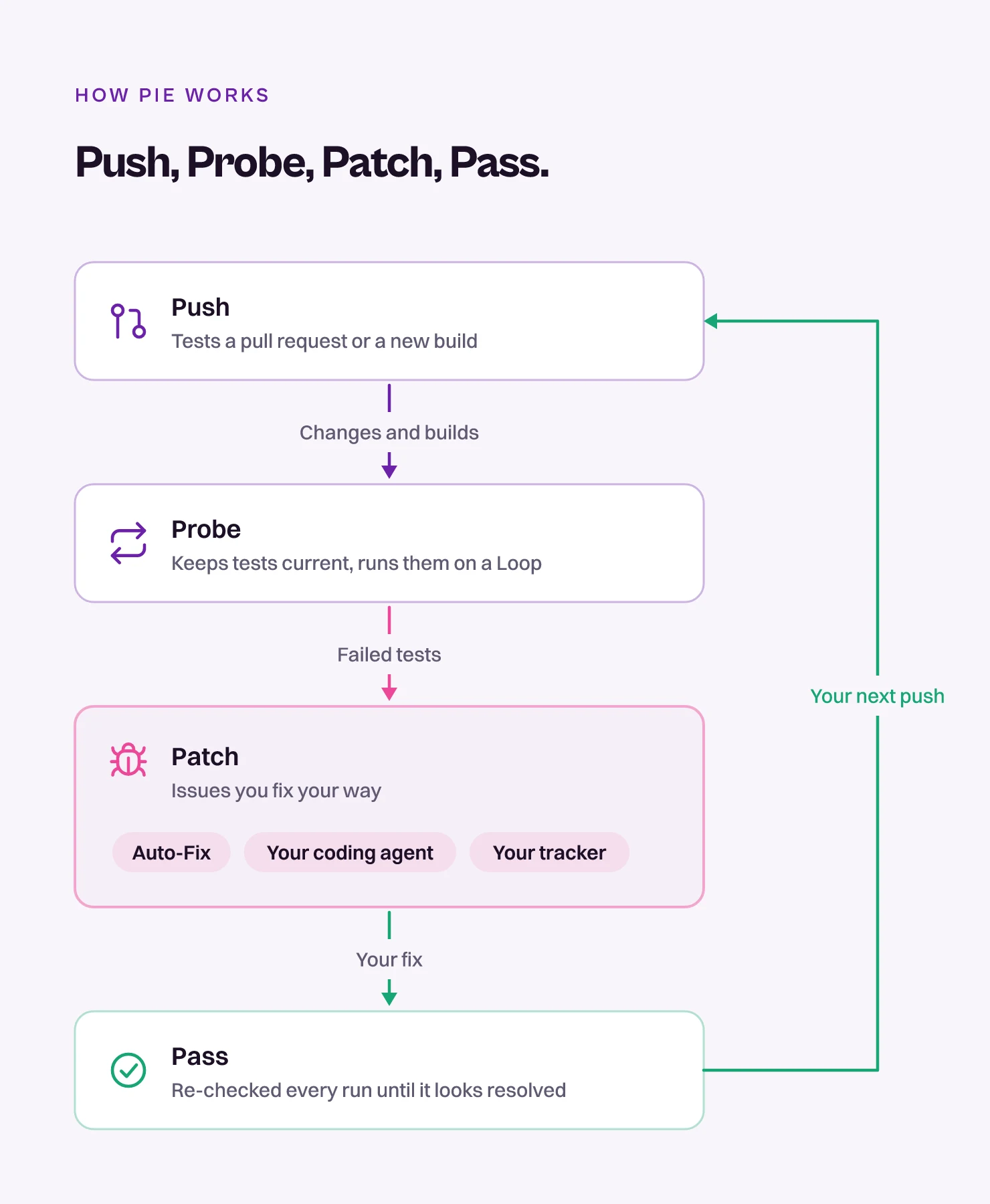
- Chat drafts the test: A tester describes the check in a sentence in Pie Chat. Pie drafts it with an objective, steps and what to verify, and the tester reviews it before it runs.
- Discovery adds a first set: Pie explores your web, iOS or Android app and generates tests for the flows it finds, so the suite starts with something.
- Failures arrive as issues: Each comes with expected and observed behavior. Your tester tracks it, which adds a repro test, exports it to Jira or Linear, or dismisses it.
- Scripts keep their jobs: Stable checks you already script stay in your framework.
What Stays With Your Testers
Four jobs stay with your testers. They were hired for this work, and the repeated pass was only ever in the way of it.
- Exploratory sessions: Following a hunch through the app is a person’s job.
- Usability calls: Whether a flow feels right is your tester’s call.
- Edge cases: Whether an odd failure matters is your tester’s call.
- Release risk: Your tester weighs in on what is good enough to ship.
Give Testers the Judgment Work Back
Every check has an owner. People take the ones that need judgment, and scripts take the ones that repeat on a steady screen. The ones in between land on whoever has a free week. The week we opened with can go back to your testers, to spend on exploratory testing and the call on what ships.
Keep the judgment and hand off the repeats. When checkout changes the day before a release, who re-checks it, and how long does that take?
Hand Off the Regression Week
Bring one check from your manual regression pass. See Pie draft the test from a sentence.
Frequently Asked Questions
Spent a decade in B2B SaaS sales before building Pie. Now obsessed with helping engineering teams ship without the fear of breaking things. LinkedIn →