Playwright vs Cypress: More Browsers or a Friendlier Debugger?
Playwright drives the browser from outside, Cypress runs inside it, and that one choice shapes Safari support and multi-tab tests. See which fits your team.

Cypress runs your test inside the browser tab, in the same run loop as the app it is testing. Playwright runs it in a separate process and drives the browser from outside. Nearly every difference you will read about, from Safari coverage to multi-tab tests, traces back to that one design choice.
For a new suite in 2026, that split usually lands on Playwright. Cypress keeps a real case with JavaScript teams who debug inside its runner. Here is how to tell which side of it your app sits on.
What you’ll learn
- The architecture split behind every other Playwright vs Cypress difference
- Which one is easier to learn, faster in CI, and better for Safari
- How Test Agents and cy.prompt compare, and what each one costs to run
- What each framework does when a pop-up nobody scripted covers the button
Quick Answer: Playwright or Cypress?
Playwright is the stronger default for a new suite in 2026. It reaches more browsers and languages, and parallel runs are built into its free runner. Cypress is the better pick for a JavaScript team testing a single-origin app, especially when your developers debug by stepping back through its in-browser runner.
Playwright vs Cypress at a Glance
| Dimension | Playwright | Cypress |
|---|---|---|
| Where tests run | In a separate process, driving the browser from outside | Inside the browser, in the app’s run loop |
| Browsers | Chromium, Firefox, WebKit, plus branded Chrome and Edge | Chrome-family, Edge, Firefox; WebKit experimental; Electron deprecated |
| Languages | TypeScript, JavaScript, Python, Java, .NET | JavaScript, TypeScript |
| Tabs and origins | Several tabs, origins and browser contexts in one test | One superdomain per test, cy.origin() for the rest, extra tabs through a plugin |
| Iframes | frameLocator() steps inside | Limited support that works, easiest on same-origin frames |
| Debugging | UI Mode with time travel, trace viewer, codegen | Interactive runner with a snapshot at every command |
| Parallel runs | Built in and free (workers plus sharding) | Cypress Cloud (free up to 500 test results a month) or the cypress-split plugin |
| Component tests | New stories model, documented as stable | React, Angular and Vue, with Svelte in alpha |
| A pop-up covers the button | The click waits, then times out, unless a locator handler covers that overlay | The click fails as covered by another element |
| AI features | Test Agents that plan, generate and heal tests, run inside your AI coding tool | cy.prompt() in beta, needs Cypress Cloud, Chromium only |
| Latest release | 1.64.1, October 14, 2026 | 16.2.0, October 13, 2026 |
| License | Apache 2.0 | MIT |
TLDR, Playwright takes the rows about reach and scale, and Cypress takes the debugging row.
What Is Playwright?
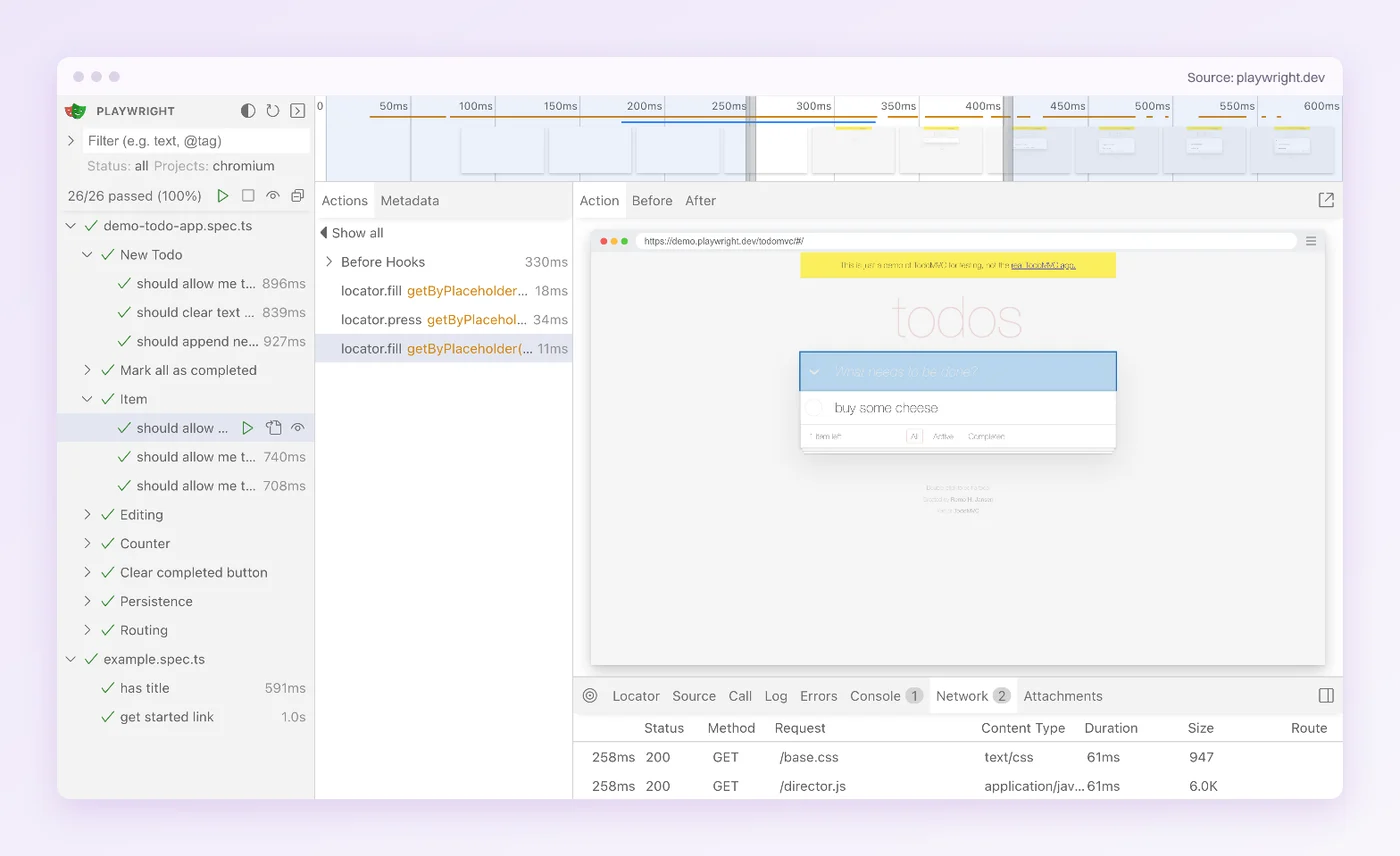
Playwright is Microsoft’s open-source framework for browser automation and end-to-end testing, licensed under Apache 2.0. One API drives Chromium, Firefox and WebKit, and it reached 1.0 on May 6, 2020. Tests can be written in JavaScript or TypeScript, and the same API ships for Python, Java and .NET. The toolkit around that API is most of why teams pick it:
- Playwright Test: The runner, with parallel workers and auto-retrying assertions built in.
- UI Mode and trace viewer: Step through a run with a DOM snapshot for each action, plus console output and network requests.
- Codegen: Records your clicks in a browser as a runnable test.
- Test Agents: Planner, generator and healer definitions for AI coding tools, added in 1.56.
Its own docs name the limits. Its WebKit is a patched build rather than Safari itself, and its Android automation is marked experimental.
What Is Cypress?
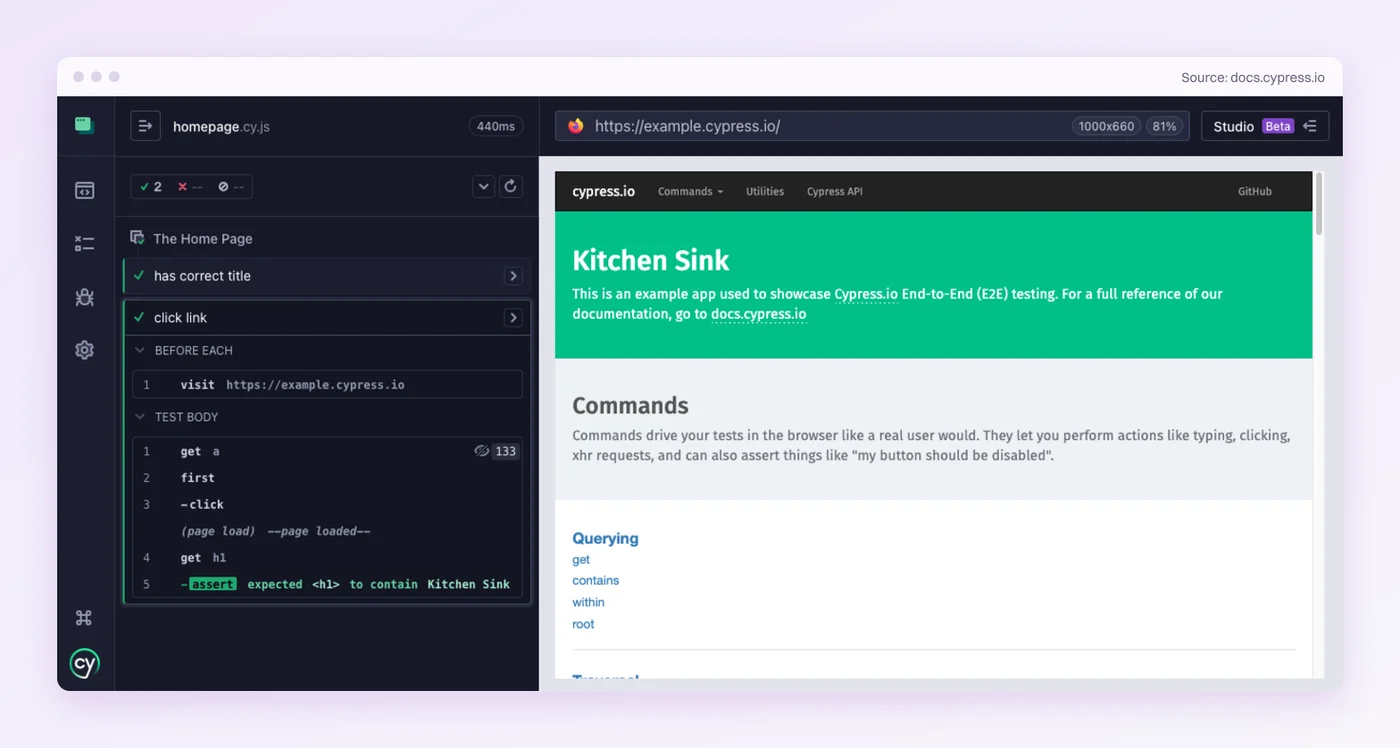
Cypress is an open-source end-to-end testing framework for web apps, MIT-licensed and built by Cypress.io. Its free app is an interactive runner that lists every command as it executes against your app and keeps a snapshot at each one, so you can time-travel back through a test the way you scrub through a video. It runs end-to-end and component tests, written in JavaScript or TypeScript.
Version 1.0 shipped in October 2017, and the project is not slowing down. Cypress published 24 stable releases between January and mid-October 2026. Cypress 16 arrived on September 1 and deprecated Electron as a test browser, and 16.2 added cy.getByRole() on October 13.
Cypress Cloud is the separate service on top. It records runs and spreads specs across CI machines, with a free tier and paid plans above it. As of October 2026, the two projects compare like this:
| Signal | Playwright | Cypress |
|---|---|---|
| Stable releases, January to mid-October 2026 | 13 on GitHub | 24 in the changelog |
| Weekly npm downloads, September 28 to October 4 | 86.2 million (@playwright/test) | 7.4 million |
| GitHub stars, October 24 | 98,371 | 51,014 |
| State of JS 2025 usage | 50% of 11,397 respondents | 47% of 11,388 respondents |
| State of JS 2025 satisfaction (users who gave a view) | 94% | 57% |
2025 was the first State of JS edition in which Playwright led on usage. The satisfaction gap is the starker number. Of respondents who had used Cypress and gave a view, more than four in ten were negative about it.
Playwright vs Cypress: 7 Key Differences
The first difference is the cause, and the next four mostly follow from it. The last two cover component, API and iframe testing, then the new AI features.
1. Where the Test Code Runs
Cypress’s model is almost like a tester sitting inside the page with a hand on every object. Its docs say Cypress is executed in the same run loop as your application, with native access to every object in it, from the window to your app’s own functions. That access is where the debugging experience comes from. It also sets three limits, all listed on the Cypress trade-offs page:
- One browser at a time, never two in the same test
- One tab, unless the
@cypress/puppeteerplugin adds another - One superdomain per test, with
cy.origin()for anything else
cy.origin() became generally available in Cypress 12. Cypress 14 made it required between subdomains as well, so app.example.com and www.example.com now count as separate origins by default.
Playwright is the same tester at a separate keyboard. The test runs in its own process, apart from the page, and drives Chromium plus patched builds of Firefox and WebKit from outside.
Sitting outside the page is what lets one test open several tabs and cross origins. It is also why the same API runs from Python, Java or C#. It gives up the in-page view, and the trace viewer and code generator make up for most of it.
Cypress sees more of your app. Playwright reaches more of the browser.
2. Which Is Easier to Learn?
Cypress is easier in the first week. By the end of the first year, Playwright usually is.
In week one, Cypress’s runner shows each command run in a real browser. You can click back to any step and see the app as it was, and there is one language to learn. For front-end developers writing their first end-to-end tests, that loop is hard to beat.
Over a year, Playwright tends to pull ahead. Codegen records a flow into a runnable test. The trace viewer lets you explore a recorded CI run action by action, with DOM snapshots and every network request.
Backend engineers can own tests in the language they already write. Its config sets up a project for each browser or device you test, which is more to decide on day one, and none of it needs a cloud account.
Week one goes to Cypress. The long run goes to Playwright, especially on polyglot teams.
3. Which Covers More Browsers and Languages?
Playwright covers more of both, by a wide margin. It drives all three major rendering engines plus branded Chrome and Edge, so one suite reaches the engine under Safari too, with the same API in Python, Java and .NET as well as JavaScript and TypeScript.
Cypress runs Chromium-based browsers and Firefox well. Its WebKit support is experimental and switched off by default, and it runs on Playwright’s own WebKit build, installed as the playwright-webkit package. cy.origin() does not work there yet. Electron is also on its way out, deprecated as a test browser since Cypress 16.
For teams whose users are on Safari, the gap decides it. Playwright’s docs carry one caveat. Its WebKit is built from WebKit’s main branch, often ahead of what ships in Safari, and the docs suggest running it on a Mac for the closest-to-Safari results. A WebKit pass is strong evidence for Safari, short of proof.
Languages work the same way. A backend team writing Python or Java can keep its end-to-end tests in its own stack with Playwright, and Cypress asks everyone to come to JavaScript.
Playwright wins reach outright. Cypress covers you if Safari is off your list.
4. Flaky Tests: How Each Waits, and the Pop-Up Neither Expects
Both frameworks wait for you, so neither needs the hand-written sleeps that made older suites flake. They wait in different ways:
- Playwright: Before a click, actionability checks wait until the element is visible, stable, enabled and actually receives the click. Auto-retrying assertions keep checking for 5 seconds by default.
- Cypress: Queries and assertions retry for up to 4 seconds by default. An action such as
.click()waits for its element to be actionable, then runs once.
Now put a promo pop-up over the button the test needs. Playwright’s check sees that another element would capture the click and keeps waiting for it to clear. If it never clears, the test times out.
Cypress fails the click with an error saying the element is being covered by another element. Neither is wrong, since a user would have to close that pop-up first too.
Playwright gives you a way out for overlays you can predict. page.addLocatorHandler(), added in 1.42, registers a handler that runs whenever a named overlay appears and blocks an action, which suits a cookie banner that turns up on random pages. In Cypress, { force: true } gets the click through, but it skips the actionability checks entirely, so it can also click straight past a real bug.
Both only handle the overlay someone saw coming. A pop-up nobody told QA about fails every test that clicks behind it, in either framework, until someone writes a handler for it.
A team running a large Cypress suite walked us through what follows every red test. Someone decides whether the change was intended. If it was, they fix the test, and if it was not, the build goes back to the developers.
On waiting, call it a tie. On the pop-up nobody scripted, both stop the run.
5. Which Is Faster at Scale?
On a single test the two are close enough that speed rarely decides anything. On a suite of a few thousand tests gating every pull request, total feedback time decides a lot, and that comes down to parallelism and what it costs.
Playwright runs test files in parallel worker processes by default, and one flag, --shard=1/4 and so on, splits the suite across CI machines (sharding). It costs nothing beyond your CI minutes. PayPay Card’s team, writing up its move from Cypress to Playwright in April 2026, reported its web suite dropping from about 30 minutes to about 11. It named parallel execution as the most effective lever.
Cypress spreads specs across machines through Cypress Cloud. As of October 2026 the free Starter plan on the pricing page includes parallelization for up to 500 recorded test results a month, and the Team plan starts at $67 a month billed annually ($799 a year). In late 2023 Cypress began blocking third-party services such as Currents and Sorry Cypress from its recording protocol. The open-source cypress-split plugin divides specs across CI machines without any external service.
Both scale out. Only Playwright builds it into the runner.
6. Component, API and Iframe Testing
Component testing used to be a clear Cypress win. Cypress ships official mounting libraries for React, Angular and Vue, with Svelte in alpha, and runs them in the same runner as your end-to-end tests.
Playwright retired its experimental component packages. Its stories model, introduced in 1.62, runs in plain Playwright Test and is documented as stable. It is also new, and the docs still send teams on the old packages through a migration guide.
API calls are a tie. Playwright sends HTTP requests through its request fixture without loading a page, and Cypress does the same with cy.request().
Iframes are not a tie. Playwright steps inside one with frameLocator(). Cypress’s trade-offs page calls its iframe support somewhat limited but working, and same-origin frames are the easy case.
Component testing is close now. Iframes still lean Playwright.
7. What the New AI Features Write and Repair
Both projects now ship AI aimed at the same two jobs, writing tests and repairing them. Playwright 1.56, released on October 6, 2025, added three Test Agents that plug into AI coding tools. The docs now list four, Claude Code and VS Code among them:
- Planner: Explores your app and writes a Markdown test plan.
- Generator: Turns the plan into Playwright test files.
- Healer: Replays a failing test and patches it, for example with a locator update, a wait adjustment or a data fix. If it decides the feature itself is broken, it skips the test instead.
Cypress answered with cy.prompt(), introduced behind an invite in October 2025 and in beta without configuration since Cypress 15.13 in March 2026. It turns plain-English steps into Cypress commands. You can export the generated code and commit it, or keep cy.prompt() in the test so that when a cached selector stops matching, Cypress regenerates that step on the next run.
The limits matter for a buying decision. cy.prompt() needs a Cypress Cloud account and runs in Chromium-based browsers only, with no iframe or canvas support. Every execution also counts against a monthly allowance, which is 100 on the free plan.
Test Agents are not free to run either. They work inside an AI coding tool, so you pay whatever that tool and its model usage cost.
Newer hooks point the same way. Playwright 1.62 bundles its MCP server and CLI for coding agents, and Cypress 15.21 added cypress tap, which gives an AI agent direct access to an open-mode session.
Look at what each one edits. The healer patches the failing Playwright test in your repo, for example by updating a locator, and cy.prompt() picks a new Cypress selector at run time. Each is a faster way to repair a test that broke.
Playwright’s agents cover more of the job. cy.prompt heals at run time and needs Cypress Cloud.
See a Suite Nobody Wrote
Point Pie at your staging app. Watch the agents map its flows.
Which One Should You Choose?
Choose on what your app needs and who on your team will write the tests. The first three items on the Playwright list are hard constraints. If one of them is true for you, it outweighs everything on the Cypress list.
Choose Playwright If
- Your users are on Safari and you want WebKit in every CI run
- Your engineers write Python, Java or .NET and should own tests in that language
- Your flows open new tabs, cross domains or need two signed-in users in one test
- You run a large suite on every pull request and want sharding built into the runner
- You want AI agents that plan, write and repair tests inside your coding assistant
Choose Cypress If
- You already run a Cypress suite that works and nothing above is forcing a move
- Your app lives on one origin and your team writes JavaScript or TypeScript
- Your developers debug by stepping back through the in-browser runner
- Your component tests already run on Cypress’s React, Angular or Vue mounting
- Your users are on Chrome, Edge and Firefox, and Safari is not a requirement
Can You Run Cypress and Playwright Together?
Yes. Cypress’s own guide for teams moving the other way says the two can coexist in one repository during a transition, and that most migrations are incremental.
The same holds from Cypress to Playwright. Keep the Cypress suite running and write new coverage in Playwright, starting with WebKit or cross-origin flows. Retire old tests as you touch them.
Two frameworks also mean two CI jobs and two backlogs, so give the overlap an end date. If Playwright is only one option on your list, weigh it against the other Cypress alternatives before you plan the move.
Where Selenium Fits
Selenium usually enters this decision because a team already runs it. Its WebDriver protocol is a W3C Recommendation, and its five core language bindings include Ruby, which neither framework above supports. Long-lived suites often stay on it because a migration costs more than the upgrade returns.
For a new project the call usually comes down to the two frameworks above. The Cypress vs Selenium vs Playwright comparison puts all three side by side, and a wider shortlist of test automation tools helps when you are deciding what kind of tool fits your team.
What Neither Framework Changes
Four things stay the same whichever one you choose, and none of the AI features above removes them.
- Authoring: Someone on your team writes and reviews every test, whether they type it or prompt an agent for it.
- Locators: Each test points at the page through a role, a
data-cyattribute or a CSS path. Playwright’s docs recommend role locators first. Cypress’s best practices still rank adata-cyattribute best, with its newcy.getByRole()a step below. Either survives a renamed class, and each breaks when the attribute, role or label it points at changes. - Unscripted UI: A pop-up or consent banner nobody planned for stops every test that clicks behind it until someone handles it.
- Native mobile: Neither is built for native iOS or Android apps. Playwright’s Android support is experimental and aimed at Chrome and WebView, and Cypress has none. Mobile coverage means a second tool such as Appium or XCUITest.
Before you decide whether that matters, estimate your own maintenance hours. If the number comes out small, either framework is a fine answer. If it does not, the runner matters less than who does that work.
Where Pie Fits
Pie is an agentic testing platform for web, iOS and Android apps. Its agents explore your app and generate end-to-end tests before anyone writes one, and your team adds the flows they missed in plain English. Execution is vision-first, so your team can author supported tests without maintaining selectors, and moving a recognizable button can require no locator repair.
We have the pop-up case on a recording. In a January 2025 call, Jinoo Jain, our CPO, walked a prospect through a run the agent had made on a shopping app. A pop-up announcing a party happening now covered the first screen. The agent closed it and went on with the test, which was to save a shoe size of 5 and filter search results by it.
Results came back with sizes other than 5. The agent checked the filter first, then went back to the profile. The saved size had never stuck, and that is what it reported.
Native iOS and Android apps run on simulators and emulators. The agents are stochastic, so two runs can take slightly different paths to the same check, and a change to the flow itself needs the test updated. Pricing is custom, tailored to your team’s requirements and testing volume.
The QA owner on one demo call made the case for strictness. Sometimes you want a test to fail when a button slides out of view, because a hidden checkbox was once the bug. When a control is hidden or gone and the agent cannot finish the flow, the run fails. Where a check needs code-level control of one exact element, keep a Playwright or Cypress test beside it.
Fi makes smart GPS collars for dogs and cats, and its CEO put the stakes in release terms:
“As we scale our products and offerings it’s really important to make sure we don’t ship something that breaks the existing experience for our users. PieLabs has helped us elevate our level of confidence, and the speed at which we can release new products.”
— Jonathan Bensamoun, CEO, FiPick the Framework, Then Plant a Pop-Up on Staging
If your users are on Safari, pick Playwright. If your flows cross origins or your testers write Python or Java, pick Playwright too. A JavaScript team on a single-origin app that lives in the time-travel runner has every reason to stay on Cypress.
Then plant a promo pop-up on staging and run the suite. Every test that clicks behind it stops, in either framework, until someone writes a handler for that overlay. Playwright’s healer can draft the fix, after the run has already gone red.
We built Pie’s agents for that case. They can close a pop-up nobody scripted and keep testing, on the web and in native iOS and Android apps. If a control is gone and the agent cannot finish the flow, the run fails, and that is the failure you want.
Stop Re-Fixing the Same Selectors
Bring the flow your team fixes every sprint. Watch the agents run it.
Frequently Asked Questions
For most new projects in 2026, no. Playwright reaches more browsers and languages, and parallel runs come free in its runner.
Cypress is the better pick for a JavaScript team testing a single-origin app, especially one whose developers debug by stepping back through its in-browser runner.
No. Cypress is the easier one in the first week, because its runner shows each command against your app and there is only JavaScript or TypeScript to learn.
Playwright has more to configure, such as a project per browser, then pays it back with codegen and the trace viewer.
For a JavaScript team testing a modern web app, usually yes, because Cypress waits for elements on its own and lets you debug inside the browser.
Selenium makes more sense when your testers write Ruby, or when a Selenium Grid is already running your suite.
No. Cypress shipped 24 stable releases between January and mid-October 2026, including Cypress 16 in September.
Playwright has the momentum, though. In the State of JS 2025 survey it passed Cypress on usage, and its satisfaction score was 94%, against 57% for Cypress.
Yes. Teams migrating usually keep the Cypress suite running and write new tests in Playwright, starting with what Cypress handles least well, such as WebKit or cross-origin flows.
Each runner launches its own browser, so the two can share one repository during the move.
On one test the gap is small. On a large suite Playwright usually returns results sooner, because parallel workers and sharding are built into its free runner.
Cypress parallelizes through Cypress Cloud, which is free up to 500 recorded test results a month and paid beyond that, or through the cypress-split plugin.
No. Playwright's healer and Cypress's cy.prompt both shorten a repair, by patching the failing test or regenerating a step at run time.
Each test still finds its element through a locator your team owns, so a UI change can mean a repair.
Pie is an agentic testing platform. Its agents explore your web app, and your native iOS and Android apps on simulators and emulators, then generate end-to-end tests.
Execution is vision-first, so your team can author supported tests in plain English without maintaining selectors.
Eight years building search and delivery systems at Amazon. The kind of scale where flaky tests block billion-dollar releases. Now CTO at Pie, building AI agents that adapt when your UI changes. LinkedIn →