Regression Testing in CI/CD: What Runs on Every PR and What Waits Until Tonight
A green pull request and a red nightly run mean checks sit in the wrong lane. Give each lane a time budget and an owner so breaks surface at the PR.

Your pull request merged green on Tuesday. On Wednesday morning the nightly regression run is red. Four merges landed in between, and the morning goes to reading diffs to find whose change broke it.
The pull request run was too thin to catch the break, and the nightly run sat too far from the change to blame anyone. Here is how to give each lane a time budget and an owner, so the next red run points at one change.
What you’ll learn
- The three regression lanes in a pipeline and what each one runs
- How to set a budget and name an owner for the pull request, merge, and nightly lanes
- How a nightly failure becomes a standing pull request check, with a worked example
- Where lanes break, from shared test accounts to a silent schedule, and what a failure report should say
- How to run the nightly lane in a Pie Loop
How Should Regression Testing Run in CI/CD?
Run regression testing in three lanes, plus a short pre-release check. A pull request lane runs a small, fast subset and blocks the merge. A merge lane runs the broader suite against the merged code. A nightly lane runs everything, including the slow and wide checks, and reports to a named owner. The pre-release check then runs the critical journeys on the release build before it ships.
Each lane answers a different question:
- Pull request lane: Did this change break anything obvious?
- Merge lane: Does the change hold up next to everyone else’s? That check is the core of continuous testing.
- Nightly lane: Does the product work end to end, even on a day nobody touched it?
What Runs in Each Lane
Set the budget for each lane before you fill it. Developers wait on the pull request lane, so it has to finish while they wait. Martin Fowler’s Continuous Integration article cites a ten minute build as the XP guideline. The nightly lane has no one waiting, so it can carry whatever the other lanes cannot afford.
| Lane | Trigger | What runs | Blocks? | Failure owner |
|---|---|---|---|---|
| Pull request | Every push to the PR | Tests tied to the change, plus critical-path smoke | The merge | The PR author |
| Merge | Merge to main | The broader regression suite on merged code | The release candidate | The merge author, with on-call as backup |
| Nightly | A schedule | The full suite, plus slow and wide checks | Nothing, it opens a ticket | A named owner for the lane |
| Pre-release check | A release candidate | Critical journeys on the release build | The release | The release owner |
What belongs in the pull request lane is a judgment call, and it should stay short. Start with the tests that cover the changed code and the journeys that would hurt most if they broke, such as sign-in and checkout. Everything that duplicates those checks moves to a later lane. The workflow file is the easy part, and step 4 of how to automate regression testing shows one that shards the pull request run across four jobs.
The pre-release check is the only run that tests the artifact you ship. It runs the critical journeys on the release build itself, so a packaging or signing problem shows up before customers see it.
How to Set a Budget for Each Lane
A budget is a number the lane may not exceed, and it only holds if it comes from measurement. Record each lane’s run time for two weeks, then set the budget from the slow runs instead of the average. Developers remember the day the pull request lane took twenty minutes, not the nine days it took six.
| Lane | The budget is set by | First lever when over |
|---|---|---|
| Pull request | How long a developer waits before switching tasks | Move checks that duplicate each other to a later lane |
| Merge | The gap between merges, so runs do not queue | Split the suite across parallel runners |
| Nightly | The hour the team starts work | Add runners or split the suite across two scheduled jobs |
| Pre-release check | The release window | Trim the journeys to the ones that gate this release |
When a lane runs over, buy time in this order. Remove duplicated checks first, then split the suite across parallel runners, and cut coverage last. A budget also tells you how many tests fit, and the regression suite guide shows how to size a tier from its time budget and runner count.
Runners stop helping once the test environment becomes the limit. On one customer’s app, their own bot protection set the length of a regression run. Once heavier traffic got blocked, we had to run the suite a few tests at a time, and more runners would not have made it shorter. Budget the lane against what the environment accepts, not against the runners you can buy.
How a Nightly Failure Becomes a Pull Request Check
The lanes improve each other when failures move between them. A red nightly run is a pull request check that did not exist yet.
- Find the change: List the merges between the last green nightly and the red one, then narrow the range until one change fails.
- Write a small reproducer: A test that fails on that change alone is cheaper to run than the nightly test that found it.
- Add it to the pull request lane: Note why it is there, so the next person who prunes the lane knows which break it guards.
The same loop runs in reverse. When the pull request lane drifts over its budget, move the tests that duplicate each other to the nightly lane, and the gate stays inside its time. Pruning the suite keeps every lane honest.
Example (illustrative): Four merges land on Tuesday. At 02:00 the nightly run fails one test, “apply a coupon at checkout,” which was green the night before. The range is four merges, so the lane owner reruns the failing test on the merge commits, starting in the middle. Git’s bisect command can run that search automatically. The test passes on the second merge and fails on the third, which changed the rounding helper the coupon code calls.
The owner writes a small test that applies a coupon to a price with a rounding edge and confirms it fails on the third merge. It joins the pull request lane with a note naming the checkout break it guards. The next change that touches the helper meets that test before it merges, so the nightly run never has to find the same break twice.
Give the Nightly Lane an Owner
Schedule the full suite in a Pie Loop. Keep the gate small.
Five Ways Regression Lanes Break
Five problems break lanes, and four of them live outside the tests themselves:
- Shared test accounts: Pull request and scheduled jobs that share logins or quotas collide, so a big nightly run can fail a late pull request. Give each lane its own accounts, or run them one after another.
- Wrong blame: In GitHub Actions, scheduled workflows run on the default branch, so a red nightly points at a range of merges, not at the newest pull request.
- Flaky tests: One flaky test in the blocking lane teaches everyone to rerun instead of read. Detecting and quarantining flaky tests is its own discipline.
- Stale runs: A new push makes the old run meaningless. A concurrency group with
cancel-in-progresslets the newer run cancel the older one, so the lane spends its budget on current code. - A silent schedule: GitHub disables scheduled workflows in a public repository after 60 days without repository activity. A nightly lane can go dark with nothing red to show for it, so check that it ran.
GitHub’s pull request event runs its workflows on the pull request’s merge branch. The lane then tests the code that would land on main, which is the code the gate exists to protect.
Match the Symptom to the Move
Each failure pattern points at a lane problem, and each has a first move.
| Symptom | Likely cause | First move |
|---|---|---|
| The pull request lane keeps growing | Checks that duplicate each other | Move the duplicates to the nightly lane |
| Pull requests pass, then the nightly run fails | The gate is too thin for what changes | Promote the failing check into the pull request lane |
| The nightly run stays red for days | No owner, or no way to find the cause | Name an owner and narrow the merge range |
| Developers rerun red builds without reading them | A flaky test in the blocking lane | Quarantine it to the nightly lane until it is fixed |
| No nightly result for a few days | A disabled or failing schedule | Alert when the run has not reported by a set hour |
Wire the alerts narrow before you wire them wide. Start with the breaks that hurt, such as a nightly run that never reported or a checkout journey gone red. An alert on every failing test turns into noise the team learns to ignore.
What a Lane Failure Report Should Say
The nightly lane works almost like a night shift. Nobody watches it run, so the handover it leaves decides how fast the failure closes. A report that says only “nightly failed” sends the owner digging. A report with these fields starts them at the fix:
- The test and the lane: Name the failing check and where it ran.
- Last green and first red: Link both runs so the owner can compare them.
- The merge range: List the merges between those two runs.
- The suspect change: Add it when a bisect has already narrowed the range.
- The evidence: Attach the log, screenshot, or trace from the failing run.
- The owner and the next step: Name who has it and what happens next.
Run the Nightly Lane in a Pie Loop
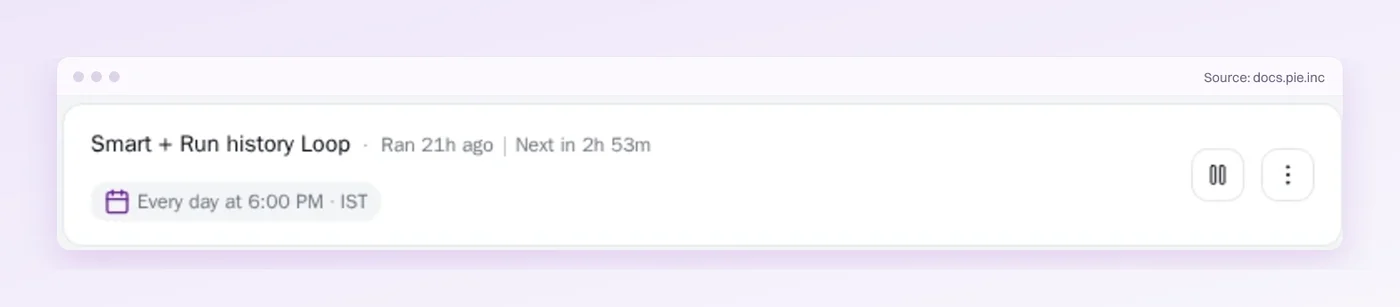
Nobody waits on the nightly lane, which makes it the easiest one to hand off. Pie’s agentic testing platform explores your app and generates the tests, and a Pie Loop runs the saved suites you pick on a schedule, such as daily or weekdays.
- A schedule per suite: Run the full regression suite nightly and give a short critical-path suite its own schedule.
- No scripts to write: Pie’s tests come with no locators to break.
- New mobile builds: For iOS and Android apps, existing tests can rerun against a new build when the Loop’s new-build trigger is set.
Let the Lanes Teach Each Other
Regression testing in CI/CD works when each lane has a budget and an owner. The pull request lane stays small because the nightly lane catches what it misses, and every miss moves one check to the gate.
The nightly lane is the one that goes unowned, like the Wednesday run with four merges to read. A Pie Loop keeps that suite on its schedule, so whoever owns the lane starts the day from a finished run.
Over a quarter, the gate gets smarter without getting slower.
Keep the Gate Fast and the Nightly Honest
Hand the nightly run to Pie. Spend the gate's minutes on the change.
Frequently Asked Questions
It is rerunning existing tests automatically as code changes, to confirm that nothing which worked before has broken.
A fast subset runs on each pull request and the full suite runs on a schedule. A break then surfaces close to the change that caused it.
Usually not. Run the tests that cover the changed code plus a short set of critical journeys, such as sign-in and checkout.
The pull request lane has to finish while the developer waits, so the slow and wide checks wait for the merge or nightly lane.
The full suite, including the slow end-to-end flows and the wide browser or device sweeps.
A nightly run tests the main branch rather than one pull request, so it catches drift and interactions between merges that a small gate cannot see.
The pull request lane should finish while developers wait. Martin Fowler's Continuous Integration article cites a ten minute build as the XP guideline.
Nightly and pre-release runs can take longer because nobody is waiting on them. Set each budget from your slow runs, not the average.
It can, with extra setup. Mobile lanes need a build to test, so the pipeline must produce one and hand it over.
Device or simulator capacity limits how much runs in the pull request lane, so keep the broad device sweep in the nightly lane.
Start by moving checks that duplicate each other to a later lane. Then split the suite across parallel runners, and cut coverage only as a last step.
Parallel runners stop helping once the test environment limits how much traffic it accepts at once.
Yes. A Pie Loop runs the saved suites you choose on a schedule, such as daily or weekdays, and a short critical-path suite can keep its own schedule.
For iOS and Android apps, existing tests can also rerun against a new build when the Loop's new-build trigger is set.
Eight years building search and delivery systems at Amazon. The kind of scale where flaky tests block billion-dollar releases. Now CTO at Pie, building AI agents that adapt when your UI changes. LinkedIn →