Test Automation Best Practices: Run a Suite Your Team Still Trusts
Passing tests do not prove a suite works. Six practices for running test automation once it exists, from independence and data to flakes, owners and retirement.

Your pipeline goes red after a merge, and the first question in the channel is whether anyone can just rerun it. Someone does. It goes green, nobody asks why it was red, and the failure joins the pile of things the suite does that people have learned to ignore.
Writing the suite was the project, and running it is the job. If you own a suite that already exists, here is how to make a green build mean something again.
What you’ll learn
- Which practices apply once a suite exists, and the check behind each one
- A script that finds tests that depend on run order
- How to quarantine a flaky test so the date cannot be forgotten
- Who owns a red build, and the three causes to split it into
- When to delete a test
What Are Test Automation Best Practices?
Test automation best practices are the habits that keep a suite trustworthy after it exists. They decide whether a red build means something and whether a green one can be believed.
Choosing what to automate and which test automation tools to buy happens earlier. Everything below assumes a test automation suite is already running in your pipeline. Six practices cover the running of it, and each comes with a check you can run or a rule you can enforce.
| Practice | Rule | Proof it holds |
|---|---|---|
| Independence | A test passes alone and in any order | The shuffle check exits clean |
| Data | Each test creates the records it uses | Two suite runs at once do not collide |
| Flaky tests | A flake gets an owner and a date | No quarantine outlives its date |
| Red builds | One owner takes the first look | Each red resolves to app, test or environment |
| Reports | A failure explains itself | Nobody opens a log to learn what broke |
| Retirement | A test leaves when its reason does | Deleted tests are named in the pull request |
1. Make Every Test Pass Alone and in Any Order
A test that only passes after another test has run carries a hidden dependency, and the default run order hides it. That order is the one that has always passed, which makes it the weakest evidence you own. Martin Fowler’s article on non-deterministic tests lists lack of isolation first among the causes, and Playwright’s best practices guide asks for the same thing in its own terms: every test gets its own storage, data and cookies so it can run independently.
You can check for a dependent test mechanically. Run every test alone in a fresh process, run the full suite in shuffled orders, and flag any test whose result changes between them.
We wrote that check with the standard library only and ran it on Python 3.14. The demo file has two tests that share one module-level list.
import unittest

CART = []  # module state shared by every test in this file


class CartTests(unittest.TestCase):
    def test_cart_starts_empty(self):
        self.assertEqual(CART, [])

    def test_item_can_be_added(self):
        CART.append("sku-1")
        self.assertEqual(CART, ["sku-1"])
In the default order this file passes, because the empty-cart test runs before the one that fills the cart.
$ python -m unittest discover demo_bad
Ran 2 tests in 0.000s
OK
Here is the checker. It discovers the tests, runs each in its own process, then runs the suite in five shuffled orders and compares every result with the test’s solo result.
"""Run each test alone, then the suite in shuffled orders. Report tests whose result changes."""
import json, random, subprocess, sys, unittest


def flatten(suite):
    for item in suite:
        if isinstance(item, unittest.TestSuite):
            yield from flatten(item)
        else:
            yield item


def discover(start_dir):
    return {t.id(): t for t in flatten(unittest.defaultTestLoader.discover(start_dir))}


def child(start_dir, ids):
    """Run the given test ids, in the given order, in a fresh process."""
    out = subprocess.run(
        [sys.executable, __file__, "--run", start_dir, *ids],
        capture_output=True, text=True, check=True,
    )
    return json.loads(out.stdout)


if __name__ == "__main__":
    if sys.argv[1] == "--run":
        tests = discover(sys.argv[2])
        result = unittest.TestResult()
        for test_id in sys.argv[3:]:
            tests[test_id].run(result)
        bad = {t.id() for t, _ in result.failures + result.errors}
        print(json.dumps({i: i not in bad for i in sys.argv[3:]}))
        sys.exit()

    start_dir, runs = sys.argv[1], int(sys.argv[2])
    ids = list(discover(start_dir))
    alone = {i: child(start_dir, [i])[i] for i in ids}
    flipped = set()
    for seed in range(runs):
        order = random.Random(seed).sample(ids, len(ids))
        for i, ok in child(start_dir, order).items():
            if ok != alone[i]:
                flipped.add(i)
    for i in sorted(flipped):
        print(f"ORDER-DEPENDENT  {i}  (alone: {'pass' if alone[i] else 'fail'})")
    print(f"{len(ids)} tests, {runs} shuffled runs, {len(flipped)} order-dependent")
    sys.exit(1 if flipped else 0)
Pointed at the demo file, it names the test that breaks and exits with status 1, which is what a CI step needs.
$ python order_check.py demo_bad 5
ORDER-DEPENDENT  test_cart.CartTests.test_cart_starts_empty  (alone: pass)
2 tests, 5 shuffled runs, 1 order-dependent
The fix gives every test its own cart in setUp. The same command then exits 0.
import unittest


class CartTests(unittest.TestCase):
    def setUp(self):
        self.cart = []  # each test builds its own cart

    def test_cart_starts_empty(self):
        self.assertEqual(self.cart, [])

    def test_item_can_be_added(self):
        self.cart.append("sku-1")
        self.assertEqual(self.cart, ["sku-1"])
$ python order_check.py demo_good 5
2 tests, 5 shuffled runs, 0 order-dependentThe same idea reaches below the test, down to databases, services and the pipeline itself, and our guide to isolation strategies covers those layers. Two caveats on the script. Five shuffles expose only some dependence, so raise the run count when the suite is large. State held outside the process, such as a database row, is invisible to it.
2. Give Every Test Data It Owns
Shared data breaks a suite in two ways. Tests collide with each other, and tests collide with their own earlier runs. Reference data that nobody writes to is fine. Writable data that tests share is the problem, and two copies of the suite running at once against one environment will find it, because anything that collides is writable and shared. Three rules keep each test’s data its own.
- Unique records: Each test creates the records it needs, under names no other test or run can produce, and nothing else reads them.
- Cleanup first: Teardown only runs when a test reaches its end, so a crashed run leaves its records behind. Clear what the test is about to use at the start as well as the end.
- Stubbed services: Playwright’s guide says not to test external sites or servers you do not control, and points to its Network API,
page.routewithroute.fulfill, for returning canned responses.
Our walkthrough on preparing test data for a preview environment covers seed profiles and feature flags.
3. Put Every Flaky Test on a Deadline
A flaky test is a failure nobody has explained yet, so treat it like one and give it an owner and a date. Playwright’s retry documentation shows the right instinct. A test that failed on the first run and passed on retry is reported as flaky, so the retry leaves a record. We designed Pie’s rerun action on a similar assumption: people press it because something looked wrong the first time.
Fowler suggests keeping quarantined tests in a separate suite and fixing them quickly. He also caps the quarantine, by a count of tests or by time, with a week as his example. The ladder runs from the first flake to deletion.
- Passes on retry: Record it as a flake and let the build move.
- Flakes again: Quarantine it with an owner, a ticket and a date.
- Fixed by the date: Move it back into the main suite.
- Date reached: Delete it, or renew the date with a reason in writing.
A date nobody checks is a wish, so make it part of the suite. This decorator skips a test in the main build until its date, with the ticket in the skip reason, and fails the test once the date has passed.
import datetime
import functools
import os
import unittest


def quarantine(owner, ticket, until):
    """Skip a flaky test until a date. After the date it fails, so it cannot be forgotten."""
    expires = datetime.date.fromisoformat(until)

    def wrap(test):
        if datetime.date.today() <= expires:
            if os.environ.get("RUN_QUARANTINED"):
                return test  # the quarantine job still runs it
            return unittest.skip(f"quarantined until {until}: {ticket}, {owner}")(test)

        @functools.wraps(test)
        def expired(self):
            self.fail(f"quarantine expired {until}: {ticket}, {owner}. Fix it, delete it or renew it with a reason.")

        return expired

    return wrap
We ran it against two tests, one with a date ahead and one with a date behind.
import unittest
from quarantine import quarantine


class CheckoutTests(unittest.TestCase):
    @quarantine(owner="team-checkout", ticket="QA-142", until="2026-11-12")
    def test_coupon_applies_after_login(self):
        self.fail("flaky: depends on a timer")

    @quarantine(owner="team-search", ticket="QA-97", until="2026-10-29")
    def test_guest_checkout_totals(self):
        self.fail("flaky: depends on a timer")
$ python -m unittest -v
test_coupon_applies_after_login ... skipped 'quarantined until 2026-11-12: QA-142, team-checkout'
test_guest_checkout_totals ... FAIL
AssertionError: quarantine expired 2026-10-29: QA-97, team-search. Fix it, delete it or renew it with a reason.The expired test turns the build red on its own, and the message names the ticket and the owner. A skipped test tells you nothing, though, so give quarantined tests a lane of their own, as Fowler’s separate suite does. A second CI job that sets RUN_QUARANTINED=1 and cannot block a merge still runs them, and shows you the day one starts passing. To find out why a test flakes in the first place, see how to fix flaky tests.
Read Failures, Not Logs
Open an issue and see what broke. Every step has a screenshot beside it.
4. Name One Owner for Every Red Build
A red build with no owner becomes a red build everyone has seen, which is how teams stop trusting the suite. Give each one a single person for the first look, the author of the first commit that turned the build red. Each test directory also names an owning team, so a failure lands on someone and not on the channel.
First comes a diagnostic split, the same one you make when a service misbehaves. Is it the app, the test, or the environment? Each cause has a different owner and a different fix.
- App: The product changed and the test caught it. Fix the code or revert the change, and leave the test alone.
- Test: The product is right and the test is stale or flaky. Fix the test the same day, or quarantine it with a date.
- Environment: The product and the test are fine, and something around them broke, such as a service, a dataset or a runner. Fix the environment and note it on the ticket.
Rerunning only postpones the split and leaves the cause where it was. A build that has been red three times for the same cause is a build nobody is owning.
5. Make the Failure Report Explain Itself
A failure report earns its place when the first person to read it does not need the log. Four answers belong on the page before anyone opens anything.
- What failed: The test name and the step where it stopped.
- First failed: The commit and run where it first went red.
- Flake history: Whether this test has failed and then passed before.
- Owner: The person or team who takes the first look.
Report by first red commit, not by run. Without a first-failed time the suite cannot tell a regression from a long-running flake, and the two need opposite responses. Evidence matters once the report points at a failure. Playwright’s guide sends CI failures to the trace viewer instead of videos and screenshots, and it warns against tracing every test on CI because tracing is performance heavy. Reports that go further, separating flaky from real and pointing at a cause, are the subject of test observability.
6. Retire Tests on Purpose
A suite only gets bigger unless someone deletes from it, and deleting needs triggers the same way adding does. Three of them are worth writing down.
- Flow removed: The feature the test checks no longer exists. Delete the test in the pull request that removes the feature.
- Quarantine expired: The date passed and nobody wanted the fix. A test nobody will fix has stopped checking anything.
- Same failure twice: Two tests that go red together for the same reason report one risk twice. Keep the faster one.
Delete outright and skip the commenting-out. Version control keeps the history, and a commented-out test is a quarantine with no date.
Add Pie Beside the Suite You Already Run
Your suite checks the flows your team chose to script. Our agentic testing platform adds a second set of checks beside it. Pie explores your app and generates tests of its own, and your QA team keeps the judgment calls a script cannot make. Each issue carries its own evidence, so the first reader starts from what broke.
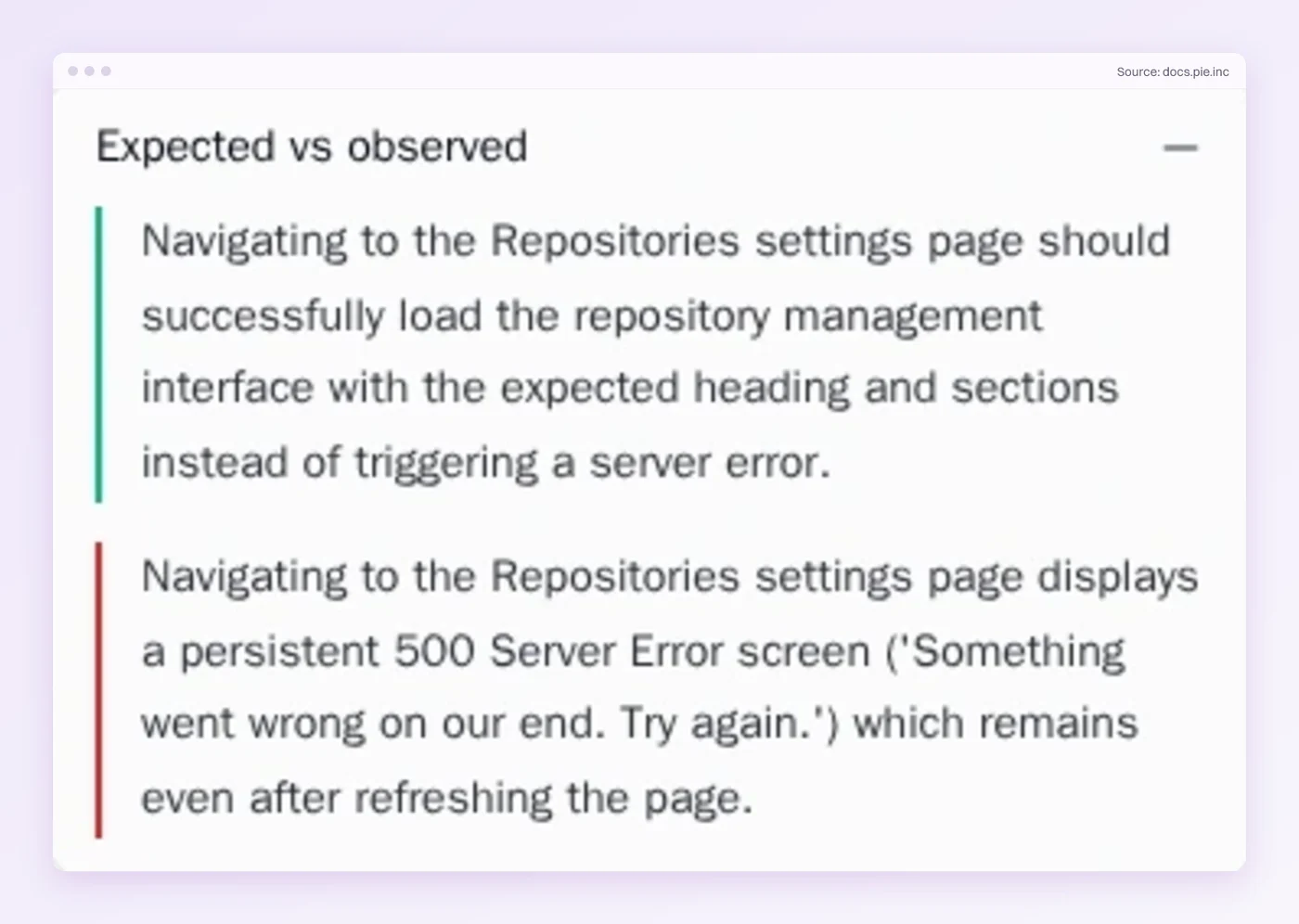
- Evidence on the issue: Open an issue and the evidence is already on the page. The Expected vs observed card shows what the test expected and what Pie saw. The Steps card shows how it got there, with a screenshot at each step.
- Where it was seen: Pie groups related findings into issues, and each issue lists the affected tests and the runs that hit it.
- Repro test: Tracking an issue creates a repro test. When later runs stop finding the bug, the issue shows Looks resolved and your team closes it.
- Fix PRs: For eligible issues, Fix opens a proposed pull request in a repository you connect, and merging stays your team’s call.
Run the Shuffle on Monday
A green build is a claim about every test in the suite. The claim holds while tests are independent, flakes have dates and reds have owners, and it fails the day any of those slips. The six habits are small, and each one is a script, a rule or a delete key.
The habits keep a suite honest about what it checks. They cannot tell you what it never checked, and no amount of shuffling will.
Start with the shuffle check, because it takes one command and tells you whether the rest of your results mean what you think. Put a date on every quarantined test the same day.
Keep Your Suite. Add Pie.
Your tests stay as they are. Pie explores the app and adds its own.
Frequently Asked Questions
Eight years building search and delivery systems at Amazon. The kind of scale where flaky tests block billion-dollar releases. Now CTO at Pie, building AI agents that adapt when your UI changes. LinkedIn →