Best UAT Software for 2026: Stop Treating Acceptance as a Phase
UAT crunch is a structure problem, not a testing problem. Compare 13 UAT tools by job, rating, and price, and see how to make acceptance continuous.

Your release date is locked. Engineering finished two days ago. And now your stakeholders are clicking through the app for the first time, finding things that should have surfaced weeks back. UAT has turned into a multi-week scramble, crammed into the worst window on the calendar, right when schedule pressure peaks and patience runs out.
Better testers and a bigger tooling budget both help. Neither one moves the date acceptance happens on, and that date is where the crunch comes from, because whatever acceptance finds arrives at the end with it. Run acceptance continuously instead, and release day becomes a sign-off, not a discovery.
What You’ll Learn
- Why the end-of-cycle UAT crunch is a structure problem, not a testing problem
- The five types of UAT and when each applies
- Thirteen UAT tools compared by job, with ratings, list prices, and reviewer complaints
- Four questions to pick the right UAT stack and where continuous acceptance testing fits
What User Acceptance Testing Actually Decides
A build can pass every automated check, clear code review, and deploy cleanly to staging, and still be the wrong software. The tests confirmed it runs. Nobody confirmed it does what the business needed.
User acceptance testing closes that gap. It is the last check before users get their hands on your product, and the one testing phase you cannot fully hand to engineers, because the question it answers is not technical.
The word doing the work in “user acceptance testing” is accept. Earlier phases answer “does it work?” UAT answers “do we accept it?” One is a fact about the code. The other is a judgment about the business, and a team can validate a feature against its spec and miss that the spec itself was wrong. The first principle behind the Agile Manifesto starts from the same place:
“Our highest priority is to satisfy the customer through early and continuous delivery of valuable software.” (Principles behind the Agile Manifesto)
Valuable is the operative word, and only the customer can judge it. Note the phrase early and continuous. Nobody in that sentence said save acceptance for the end.
A green test report cannot judge it either, which is the part teams underestimate. On a March call with a team evaluating Pie, we drew exactly that distinction. Every script passing is one result. The build being able to pass user acceptance testing is another, because a script only checks the things somebody already thought to write down.
UAT vs. QA Testing
QA testing and user acceptance testing get confused, but they validate different things. QA confirms the software behaves as engineered, through regression testing and the checks that functional testing software runs. UAT confirms the software behaves as the business needs. Pass every QA check and you can still fail UAT, because you built the wrong thing well.
| Dimension | QA Testing | User Acceptance Testing |
|---|---|---|
| Question it answers | Does the software work correctly? | Does the software meet business needs? |
| Who runs it | QA engineers, test automation | End users, business stakeholders |
| Tested against | Technical specifications | Business requirements, real scenarios |
| When it happens | Throughout development | Late stage, before release |
| Outcome | Bugs filed and fixed | Accept or reject the release |
Look at the “when it happens” row. QA runs throughout development. UAT runs late, before release. Those two timelines can converge, and they should.
UAT Is Not a Phase
The textbook version of UAT runs exactly once, at the end, under pressure, after the code is frozen. That single choice creates every problem you hate about it. Defects show up late. Fixes get rushed. Stakeholders spend their time hunting bugs instead of judging value. The window blows past its deadline.
Notice what “we can’t ship until sign-off is done” quietly assumes. Acceptance is a gate at the very end, and the whole release waits behind it. It does not have to sit there.
The better model runs acceptance-style flows continuously throughout development, so the software stays close to acceptable on every build. Think of it as continuous testing pointed at business intent instead of code correctness. By the time stakeholders sit down to sign off, there is nothing left to discover. They validate, and the scramble never starts.
Running UAT that way depends on the tools underneath it. The table lines up the main options on one question: does the tool run acceptance flows itself?
| Tool | Job in UAT | Best For | Runs Acceptance Flows Itself |
|---|---|---|---|
| TestMonitor | Test management, built for UAT | Formal sign-off and audit trails at small to mid-sized teams | No, results arrive through its API and integrations |
| TestRail | Test management | One auditable record of every acceptance run | No, your framework runs them |
| Zephyr | Test management inside Jira | Teams whose stories and sign-off live in Jira | No-code runs on Standard and Advanced editions |
| Qase | Test management | Small teams that want a free tier | No, results arrive through reporters and its API |
| Pie | Autonomous QA platform | Acceptance-style flows on web, iOS, and Android without test scripts | Yes, from its own discovery |
| BugHerd / Marker.io / Usersnap | Feedback and bug reporting | Capturing non-technical tester feedback with context | No |
| BrowserStack | Real-device cloud | Manual and automated runs on real hardware | Yes, scripted or low-code |
| TestMu AI | Real-device cloud | Device coverage plus an AI agent that drafts tests from tickets | Yes, scripted or drafted by KaneAI |
| Testomat.io | AI test management | Turning user stories and BDD steps into test cases | No, it launches your framework’s runs |
| Opkey | No-code automation for enterprise apps | Acceptance on Oracle, SAP, and Workday rollouts | Yes, no-code |
| testRigor | AI test automation | Plain-English acceptance tests your QA team owns | Yes, from plain English |
Five Types of UAT and When Each Applies
You will see five types of user acceptance testing named in the wild. Teams rarely run all of them. You pick the ones that match your product, industry, and risk. Naming the type up front keeps the effort pointed at the right acceptance criteria.
- Alpha and beta testing. Alpha runs internally, performed by employees or a controlled group before release. Beta runs externally, performed by real end users in their own environments. Alpha catches issues in a controlled setting. Beta surfaces the device, network, and usage conditions you could not predict. For mobile apps especially, beta is where real-world device fragmentation shows up.
- Contract acceptance testing. The software is tested against a predefined contract’s acceptance criteria. Common in agency and enterprise work, where “done” is written into the contract.
- Regulation acceptance testing. Verifies the software complies with legal and regulatory requirements. Critical in finance, healthcare, and other regulated industries, where a non-compliant feature carries legal exposure that no bug fix undoes.
- Operational acceptance testing (OAT). Confirms the system is ready to operate, with backups, recovery, maintenance processes, and security all functioning. It validates operational readiness rather than features.
- Business acceptance testing (BAT). Checks that the system supports the business processes and goals it was built for, exercised from the outside through real workflows, the way an end user would meet them.
By default, every one of these runs as a late-stage gate, and alpha and beta suffer for it most, because device and workflow problems get cheaper to fix the earlier they surface. The continuous model applies to all five.
Best UAT Software for 2026
No single tool covers UAT end to end. Which one is best depends on which part of the job you are solving, whether that is organizing the process, capturing tester feedback, covering the devices your users hold, or executing the acceptance scenarios themselves. Plan on two or three.
The tools below are grouped by job and left unranked, because a test management tool and a device cloud never replace each other. Every category has a ceiling, and the ceilings are where the decision gets made.
Test Management Tools
Test management tools are the system of record for what was tested and who accepted it. They hold test cases, track runs, assign testers, and capture sign-off. All four share one ceiling. They organize the acceptance pass and leave the running of it to people, or to a framework wired into CI. That makes them essential for regulated or contract-driven UAT and overkill for a three-person team shipping a web app.
TestMonitor: Built Around UAT Sign-Off
TestMonitor is built around user acceptance testing rather than adapted to it, and its sign-off and audit-trail workflow shows it.
- Rating: 4.7/5 from 20 reviews on Capterra, a small pool.
- Pricing: $13 per user per month with a three-user minimum, or $11 billed annually.
- Common complaint: One reviewer needed a session with the vendor to learn its terms for suites, cases, and requirements.
- Best for: Formal sign-off with an audit trail at small and mid-sized teams.
- Not for: Running the flows. Automated results come in through its API and integrations.
TestRail: The Established System of Record
TestRail is the long-established name in test management. It organizes UAT cases, runs, testers, and sign-off, and automated results arrive through integrations with the CI tools you already run.
- Rating: 4.4/5 from more than 600 reviews on G2.
- Pricing: From $22 per user per month on Essentials, which is cloud-only, billed annually, and capped at five users. Enterprise runs $78 per user per month. There is a 30-day trial and no free plan.
- Common complaint: Price for small teams, an interface reviewers call dated, and slowdowns on large projects.
- Best for: One auditable record of every acceptance run.
- Not for: Budget-tight small teams, which is where reviewers feel its price most.
Zephyr: Acceptance Cases Next to the Jira Story
Zephyr lives inside Jira, so acceptance cases sit next to the stories they verify. Its entry edition, Essential (formerly Squad), shows about 10,000 installs on the Atlassian Marketplace.
- Rating: G2 splits reviews across Zephyr’s editions, and the Jira editions each carry too few for a stable score.
- Pricing: Priced by Jira user tier through the Atlassian Marketplace: $10 a month covers up to 10 users on Essential, and larger tiers cost more.
- Common complaint: Speed, with slow dashboards and lag on large test sets.
- Best for: Teams whose requirements and sign-off already live in Jira.
- Not for: Automated runs on Essential. No-code execution starts at the Standard edition (formerly Scale).
Qase: The Only Free-Forever Tier of the Four
Qase is lightweight case management that records automated results from your CI through reporters and its API.
- Rating: 4.7/5 from about 300 reviews on G2.
- Pricing: Free for up to four users, then $35 per user per month billed annually.
- Common complaint: G2 reviewers flag slowdowns on very large test suites.
- Best for: Small teams that want structured UAT cases without raising a purchase order.
- Not for: Teams that want sign-off recorded inside Jira itself.
Feedback and Bug-Reporting Tools
These three let non-technical testers report issues with screenshots, annotations, and environment data captured automatically. They solve UAT’s documentation problem, the vague “it’s broken” report that engineers cannot reproduce. All three let a tester file feedback without creating an account, and that one feature often decides whether a business stakeholder files a ticket at all. None of them tests anything, and that is their ceiling. They capture what a person already found.
BugHerd: Point, Click, Comment
BugHerd lets a tester point at an element on the live page and comment on it, and it attaches browser, operating system, and screen resolution to every report.
- Rating: 4.7/5 from more than 200 reviews on G2.
- Pricing: $42 a month billed annually, or $50 monthly, for up to five users after a 7-day trial.
- Common complaint: Price. Reviewers call it pricey.
- Best for: Agencies collecting client sign-off on a live site.
- Not for: Native mobile apps. It annotates websites.
Marker.io: Reports That Land as Reproducible Tickets
Marker.io adds visual annotation and technical metadata to each report and files it in the issue tracker your engineers already use.
- Rating: 4.8/5 from 55 reviews on Capterra.
- Pricing: $39 a month billed annually on Starter, or $59 monthly, after a 15-day trial.
- Common complaint: Capture gaps, such as screenshots that miss page overlays, though many of its reviews are older.
- Best for: Teams that want UAT feedback to arrive in their tracker as a ticket an engineer can reproduce.
- Not for: Native mobile apps. The widget runs on web pages.
Usersnap: A Widget Anyone on the Page Can Use
Usersnap is a feedback widget open to anyone on the page, with console errors and the URL captured automatically.
- Rating: 4.5/5 from 93 reviews on G2.
- Pricing: Starter lists at €49 a month, and yearly billing costs less. The free trial ends at 20 feedback items.
- Common complaint: Lower tiers miss advanced features and feel expensive for small companies.
- Best for: Feedback from a wide tester group, including people outside your company.
- Not for: Managing test cases. It captures feedback and stops there.
Real-Device and Browser Coverage
UAT results only mean something if the test environment matches reality. A flow that passes on a developer’s laptop can fail on a mid-range Android phone, and that variance is exactly what beta UAT exists to surface. If you ship a mobile app, this category stops being optional.
Both clouds below now sell AI test agents on top of the hardware, so the line between this category and the next one is blurring. Either way, a device cloud gives your testers somewhere to test, and deciding what to test there stays with your team.
BrowserStack: 30,000+ Real Devices
BrowserStack advertises 30,000+ real devices. Its Low-Code Automation adds AI authoring agents, and the Self-Healing Agent it rolled out across its automation products in November 2025 repairs broken locators during a run.
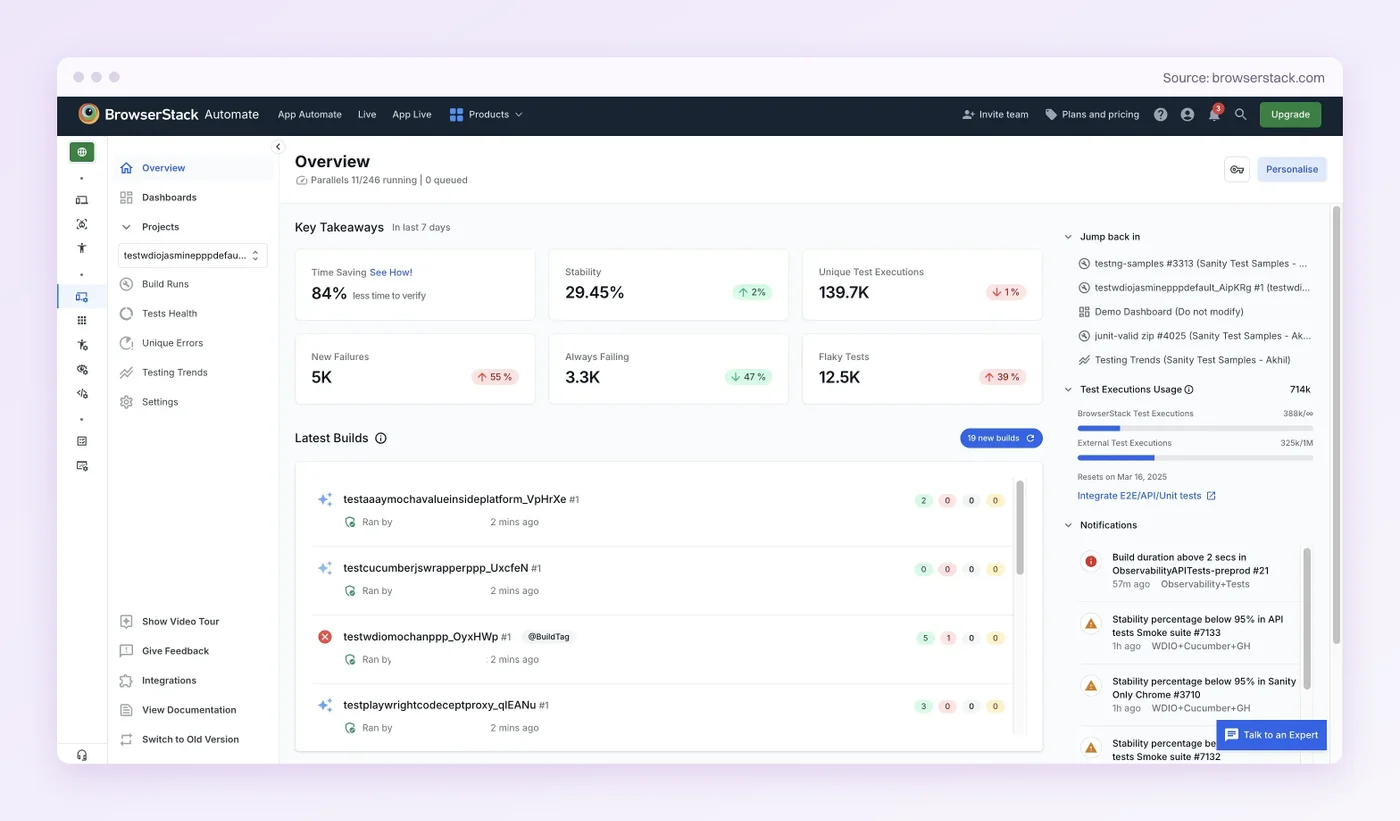
- Rating: 4.4/5 from more than 3,300 reviews on G2.
- Pricing: Live with real mobile devices from $39 per user per month billed annually. Automation is priced by parallel sessions.
- Common complaint: Slow loading and lag in mobile sessions top its G2 complaints, with price next.
- Best for: UAT on real hardware across many device and OS versions.
- Not for: Small teams that need many parallel sessions on a tight budget.
TestMu AI: Real Devices Plus an AI Test Agent
TestMu AI, the name LambdaTest took in January 2026, advertises 50,000+ real devices. Its KaneAI agent drafts end-to-end tests from plain English, a Jira ticket, or a PRD.
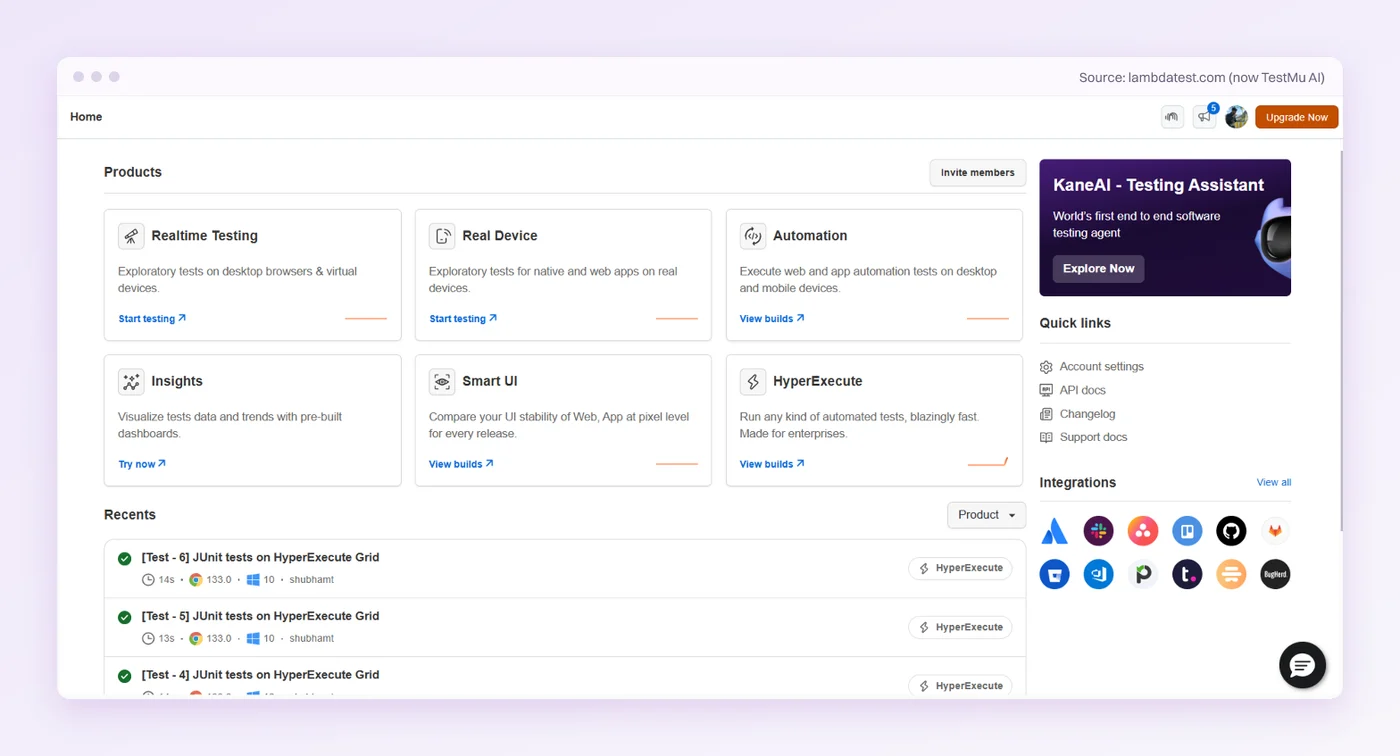
- Rating: 4.6/5 from more than 540 reviews on Capterra.
- Pricing: Per parallel session, with real devices sold as a separate tier from desktop browsers.
- Common complaint: Occasional slowness, and cost for smaller teams.
- Best for: Device coverage and a ticket-to-test agent in one account.
- Not for: Teams that only test desktop browsers. Real devices are sold as a separate paid tier.
AI and Automated Acceptance Testing
AI reshaped this category, and in 2026 it is crowded. What separates the tools is where each one starts. Testomat.io and testRigor start from something your team writes, a user story or a plain-English description, and tools like aqua cloud do the same from written requirements. Opkey starts from usage data mined from your enterprise apps. Pie starts from the running app, exploring it the way a new user would.
Katalon, mabl, and Testsigma also turn up on UAT lists. They are general-purpose automation platforms, and Katalon and mabl get full entries in our test automation tools roundup.
Testomat.io: Test Cases From User Stories
Testomat.io turns requirements, user stories, and BDD steps into ready test cases, then launches your framework’s runs through CI and collects the results.
- Rating: 4.8/5 from 94 reviews on G2.
- Pricing: Free for two users, then $27 per user per month billed annually, or $30 monthly.
- Common complaint: A learning curve on its more advanced features.
- Best for: BDD teams that write acceptance criteria in Gherkin.
- Not for: Teams without an automation framework to run the tests.
Opkey: Acceptance for ERP Rollouts
Opkey is no-code automation for enterprise apps such as Oracle, SAP, and Workday, with self-healing scripts and process mining that maps the real usage paths through the application.
- Rating: 4.8/5 from 97 reviews on G2.
- Pricing: Quote-based. No list price is published.
- Common complaint: Criticism is sparse. One G2 reviewer found its documentation hard to locate.
- Best for: Business-process acceptance on ERP rollouts.
- Not for: A consumer web or mobile app, where its prebuilt ERP tests do not help.
testRigor: Plain-English Tests Your QA Team Owns
testRigor builds automated tests from free-flowing plain English, so your manual QA team can own them without writing code. Its generative AI can also propose a first set of test cases from a description of your app.
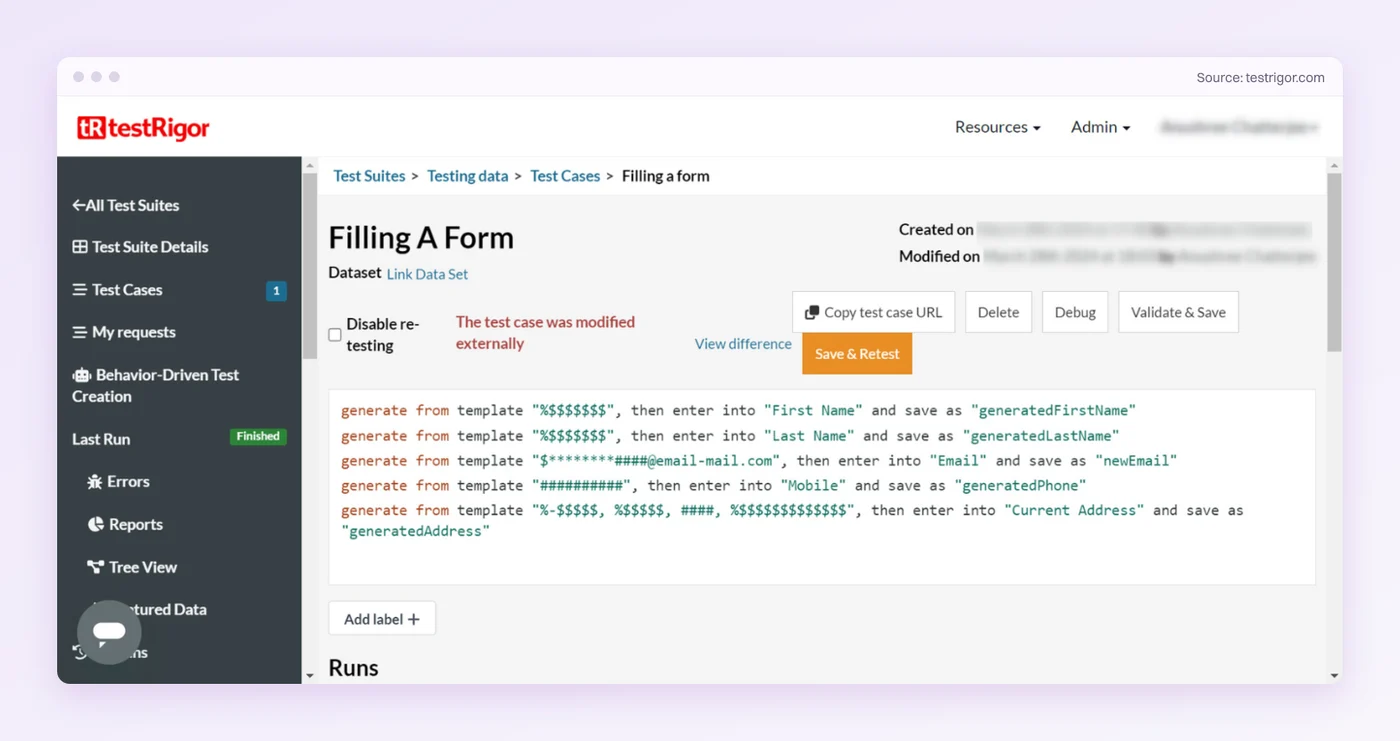
- Rating: 4.6/5 from 5 reviews on Capterra, a small pool.
- Pricing: A free public plan, where tests and results are public. Private plans start with a 14-day trial and are quoted.
- Common complaint: One reviewer tracks tests in spreadsheets for lack of built-in test management. That matters when UAT sign-off needs a record.
- Best for: QA teams that want to write and own acceptance tests in English.
- Not for: Teams that want a suite to exist before anyone writes a description.
Pie: Discovery From the Running App
Pie runs acceptance-style flows on web, iOS, and Android. Its discovery explores the reachable, supported flows in your app and drafts the tests, and execution is vision-first. The mechanism is in the Pie section further down.
- Rating: 5.0/5 from 3 ratings on Gartner Peer Insights.
- Pricing: Contact Pie for a quote.
- Best for: Acceptance coverage that runs between releases without test scripts to maintain.
- Not for: Teams that want every test hand-written in a framework they control.
All of these share one boundary. The accept or reject decision stays human. What the tools take over is the hunt before it, folding the discovery part of UAT into continuous testing so most defects are caught and fixed before sign-off begins.
Why Usability Tools Keep Showing Up on UAT Lists
Look for UAT software and several of the roundups will hand you UserTesting, Maze, or Hotjar. All three are good products solving a real problem. Just not this one. Usability testing asks whether a person can figure out your interface. Acceptance testing asks whether the business will sign off on what was built. A checkout flow can be beautifully usable and fail acceptance anyway, because it applies the wrong tax rule.
The overlap is real, though. If your acceptance criteria include “a new customer can complete onboarding unaided,” a usability platform is the right instrument for that criterion and a test management tool is the wrong one. Pick by the criterion, and let the category label on the listicle go.
Validation, Not a Bug Hunt
Move acceptance testing into the sprint. Sign-off becomes the easy part.
Free and Open-Source UAT Software
Free UAT software exists, and for a small team it can be enough. What free removes is the license line, not the labor. Open-source and self-hosted tools trade the invoice for setup, hosting, and upkeep, and the automation route trades it for engineers who maintain scripts. Add up the hours before you compare stickers.
Three routes cover most free options:
- Open-source test management. Kiwi TCMS organizes UAT cases, runs, and sign-off with no license fee if you self-host the Community Edition, and it ships every few weeks, with 16.6 out in October 2026. TestLink, the older open-source option, does the same job. Its maintainers refreshed 1.9.20 for PHP 8 in a December 2025 build and call it the last of the 1.9 line. Check where the project is headed before you build a UAT process on it.
- Free tiers of commercial tools. Qase runs a free-forever plan capped at four users, and Testomat.io runs one capped at two. TestRail, BugHerd, and Marker.io give you a time-limited trial instead, which is a different proposition. A trial gets you through one UAT cycle without raising a purchase order. A free tier gets you through the year.
- Open-source automation. Selenium and Appium are Apache 2.0 and free to script acceptance-style flows across browsers and mobile. The cost moves to your engineers, who write every scenario and repair it each time the UI shifts. Maintenance is the reason “free” automation so rarely stays cheap.
The pattern holds across all three. A free tool lowers the entry price and leaves the real cost, the human hours spent running and maintaining UAT, exactly where it was. Pie prices on a custom quote, like several of the automated options, and what continuous autonomous QA buys back is hours. The license line was never the expensive part.
Four Questions to Find Your UAT Stack
Four questions tell you which two or three categories you need, and the last one is the easiest to skip.
- How much traceability do you need? Regulated or contract-driven work needs a test management tool for auditable sign-off. A small product team usually does not.
- Who are your testers? Non-technical business users need a feedback tool that captures context automatically. Technical testers can file structured tickets without one.
- What environments matter? If your users are spread across diverse devices and browsers, a real-device cloud is non-negotiable. UAT on a single dev machine is theater.
- Can a manual gate keep up? AI coding assistants push more change through the same human review and QA capacity, and Google’s 2025 DORA report is direct about where that lands. Without strong automated testing and fast feedback loops, “an increase in change volume leads to instability”, the report warns. The same report finds 30% of respondents have little or no trust in AI-generated code. More change arriving, less confidence in it, and one manual UAT window per release to absorb both. Testing AI-generated code as fast as teams ship it is where automated acceptance testing becomes mandatory.
Match those answers against the table above and three common stacks fall out:
- Regulated, contract-driven team: Test management for the audit trail, plus automated acceptance testing so the audit is not chasing late-stage defects.
- Consumer app on many devices: A device cloud covers the hardware checks, and with auto-run on, Pie reruns acceptance flows on each uploaded build. The device pass no longer doubles as the discovery pass.
- Fast-shipping product team: Automated acceptance testing as the foundation, Pie if you want the suite drafted from the app or testRigor if your QA team wants to write it in English, with a lightweight feedback tool for the human sign-off layer on top.
Each stack has the same two layers. Human sign-off sits on top and automated acceptance testing sits underneath, so the human layer is not doing discovery work a machine should have done first.
A Continuous UAT Checklist
Most UAT checklists read like a pre-flight ritual for a phase that happens once. This one is built for the continuous model. The bulk of it runs throughout development, and the release-day steps shrink to sign-off. Written up formally, this list becomes an acceptance test plan, with scope, owners, and the exit criteria that say when sign-off can happen. Run the checklist against every release candidate.
- Write acceptance criteria before the build. Each feature gets a plain-language “done means” that a business stakeholder, not an engineer, would recognize. Vague criteria are how a build passes UAT and misses the point.
- Name your testers and their authority. List who validates each area and who owns the accept-or-reject call. Sign-off without a named owner is how “known issues” become customer complaints.
- Match the environment to reality. Test on the browsers, devices, and data your users actually have. Watch the data especially. UAT environments are often refreshed from production only on a schedule, so check how old the data is before stakeholders sign off against it.
- Run acceptance-style flows all through development. Run your core user flows on every build so defects surface the day they land. Step four is what turns the rest of the list from a scramble into a review.
- Triage by business impact. Rank each issue by what it costs the user or the business, whoever found it, and decide fix-now, fix-next, or accept before release.
- Capture feedback with context. Every reported issue carries a screenshot, the environment, and the steps to reproduce, so engineers act on it instead of chasing it.
- Make the final sign-off a decision, not a discovery. By release day, stakeholders validate value and record acceptance. If they are still finding bugs, UAT ran too late.
Seven steps, and only the last one is bound to release day. Move the discovery earlier and acceptance gets fast on its own.
How Pie Makes Acceptance Continuous
Pie is an autonomous QA platform that runs acceptance-style user flows on web, iOS, and Android, moving through the app the way a human tester would. With it, acceptance gets checked throughout the cycle instead of once at the end.
The mechanism is what makes it hold up. Scripted tests anchor to selectors, which break when the UI changes. The platform runs vision-first and reads the rendered screen to decide where to act, so a button that moves or gets restyled can keep passing without a locator repair. A redesigned flow still needs a rerun and an edit to the steps that changed.
Two things follow:
- You stop hand-writing every scenario. Pie explores the reachable, supported flows in your app, maps the user journeys it finds, and turns them into test cases. Anything behind a login needs working test credentials.
- The UAT window shrinks. With auto-run on build upload switched on, those flows run against each new build and flag issues with the screenshots from the run, so the dedicated UAT phase drops from a multi-week bug hunt to a fast human validation.
Execution is half of acceptance. The other half is judgment, and that half stays with your stakeholders. They spend the window judging value, with the defect hunt already done.
Ship With Confidence, Not Hope
User acceptance testing is the difference between shipping software you hope works and shipping software you know meets the need. It asks the business question instead of the technical one, which is exactly why you cannot skip it, no matter how green your CI dashboard looks.
You do not have to run it as a release-day scramble. Move the discovery work to machines and keep the judgment with people, and acceptance stops being a phase. Pie’s autonomous testing platform takes the execution half, so your stakeholders spend sign-off validating the build, not meeting it for the first time.
Stop Discovering Bugs at Sign-Off
Send us a build. Get back your own app with the issues already flagged.
Frequently Asked Questions
Spent a decade in B2B SaaS sales before building Pie. Now obsessed with helping engineering teams ship without the fear of breaking things. LinkedIn →