What Is Continuous Testing? How It Works in CI/CD and How to Automate It in 2026
Continuous testing runs automated checks at every CI/CD stage so feedback lands in minutes. See which tests run where, and how it differs from test automation.

Your team ships several times a day, and your testing was designed to run once a sprint. That mismatch is where bugs reach production, and the tests are rarely the problem. They simply run too late to matter.
Continuous testing checks every commit, pull request, and deploy while the code is still fresh in the developer’s head. Here is how to wire that check into a pipeline so it stays fast and survives the next redesign.
What you’ll learn
- A clear definition of continuous testing and how it differs from test automation
- Which test automation runs at each CI/CD stage, and with which tools
- The benefits, and what the DevOps research says about speed and stability
- A step-by-step path to implementing continuous testing
- Why upkeep stalls continuous testing efforts
What Is Continuous Testing?
Continuous testing is the practice of running automated tests at every stage of the software delivery pipeline, on each commit, pull request, and deployment, so quality feedback arrives within minutes rather than at the end of a development cycle. It treats testing as a constant signal embedded in CI/CD, not a phase that runs once before release.
The pipeline sense of the term grew out of the DevOps and continuous delivery movement. In Continuous Delivery (2010), Jez Humble and David Farley described a deployment pipeline in which every change passes through automated tests before it can reach release. Continuous testing is that idea applied to quality.
In a traditional model, a build counts as tested when a QA team eventually gets to it. A continuous model tests every change the moment it enters the pipeline, and the pipeline refuses to advance code that fails. Quality stops being a gate at the end and becomes a property of every stage.
Continuous testing is automated tests wired into CI/CD, run on every change, and allowed to block the release.
How Does Continuous Testing Work in CI/CD?
Continuous testing works by layering test types across pipeline stages. Each stage trades speed for coverage as a change moves toward production. Fast checks run first and often, and slow, thorough checks run later and less often. Fail fast on cheap problems and save expensive validation for changes that have earned it.
A typical pipeline runs tests at four points. Unit tests and a small smoke suite run on every commit and confirm the build is not obviously broken. Integration and API tests run on every pull request and confirm components talk to each other. The full end-to-end and regression suite runs against staging on merge to main. An acceptance and smoke gate confirms the release candidate is safe before production deploy.
A test pyramid keeps this fast enough to stay continuous. The Practical Test Pyramid recommends lots of small, fast unit tests, some coarser tests, and very few high-level ones. Invert it and lean on slow end-to-end tests for everything, and feedback gets too slow, so developers route around the gate.
What Test Automation Runs at Each Pipeline Stage
Each stage runs a different kind of test automation, and the job decides the tool.
| Stage | What runs | Typical tools | Speed target |
|---|---|---|---|
| Commit | Unit tests and a small smoke suite | JUnit, pytest, Jest | About ten minutes |
| Pull request | Integration and API tests, plus the changed flow end to end | The unit frameworks against real services, Playwright or Cypress for web, Maestro or Appium for mobile | Parallel, minutes |
| Merge to main | Full end-to-end and regression suite | Playwright, Cypress or Selenium for web, Appium or Maestro for mobile | Longer, off the developer’s path |
| Before deploy | Acceptance and smoke gate on critical flows | A trimmed copy of the end-to-end suite | Short |
The Extreme Programming guideline is a ten minute build, as the Continuous Integration article puts it, and the commit stage is where that budget applies. Exploratory testing and judgment calls stay manual, because a script cannot make them. Everything repeatable belongs in the pipeline.
Continuous Testing vs Test Automation
Continuous testing and test automation are related but not the same. Test automation is the capability of running tests without a human. Continuous testing is the practice of running those automated tests on every change, all the way through the pipeline. Automation is a prerequisite, and continuous testing is what you do with it. You can automate tests and run them only by hand once a week, which is automation without continuous testing.
The difference shows up in outcomes. A team with test automation but no continuous practice has scripts that can run on their own and often sit idle until someone remembers to trigger them. A team practicing continuous testing has the same scripts firing on every commit, with results gating merges. The first team finds bugs eventually. The second finds them in minutes.
| Dimension | Test Automation | Continuous Testing |
|---|---|---|
| What it is | A capability, tests that run without manual clicking | A practice, automated tests wired into every pipeline stage |
| When tests run | When triggered, ad hoc or scheduled | Automatically, on every commit, PR, and deploy |
| Feedback timing | Whenever someone runs the suite | Within minutes of each change |
| Release role | Optional check | A gate that blocks the release when tests fail |
| Goal | Reduce manual test effort | Catch problems on every change, before release |
What Are the Benefits of Continuous Testing?
The core benefit is that continuous testing catches defects while they are cheapest to fix, minutes after they are introduced and while the developer remembers the change. The same bug found at a release gate costs a debugging session with no memory of the change.
It also makes high release velocity safe. DORA’s research finds that speed and stability are not tradeoffs, because the delivery metrics are correlated for most teams. Releasing often with few failures depends on checking each change as it lands, which is what continuous testing does.
The practical wins compound:
- Faster feedback: Developers learn a change broke something in minutes, so the fix is small instead of an archaeology project.
- Deploy confidence: A green pipeline means the release candidate already passed every gate, so shipping is a non-event.
- Less firefighting: Fewer escaped defects mean fewer production incidents and fewer hotfix interruptions.
- A shared signal: When the pipeline is the source of truth, “is it safe to ship?” has an automatic answer.
How to Implement Continuous Testing (Step by Step)
Implementing continuous testing is less about buying a tool and more about wiring the right tests into the right stages and protecting the feedback speed that keeps it working.
-
Map your critical flows first. Before automating anything, list the handful of user journeys that would do real damage if they broke, such as authentication, checkout, and core navigation. These become your highest-priority continuous tests. Coverage everywhere is a trap, and coverage on what matters is the goal.
-
Build the pyramid, not the inverse. Write many fast unit tests, a solid middle layer of integration and API tests, and a focused set of end-to-end tests for your critical flows. Resist the urge to test everything end to end. Slow end-to-end layers are what make a commit stage too slow to wait for.
-
Wire tests into pipeline stages. Configure your CI system (GitHub Actions, GitLab CI, CircleCI, or Bitrise for mobile) to run smoke tests on every commit, integration tests on every PR, and full regression on merge. Tag tests by tier (
@smoke,@regression,@release) so each trigger runs only what it needs. At the pull request stage, point the tests at a preview environment that holds the whole change, not a shared staging API, or the stage passes on code that is not in the PR. -
Make the gate real. A failing test must block the merge or deploy. A pipeline that warns but lets red builds through trains your team to ignore it. The gate is the entire point.
-
Guard your feedback speed. Keep the commit stage near ten minutes. When it creeps past that, parallelize, prune redundant tests, or move slow checks to a later stage. Slow feedback is feedback developers learn to skip.
-
Attack flakiness relentlessly. Flaky tests quietly kill continuous testing, because every flaky failure teaches developers to rerun instead of read. Quarantine flakes, fix the root causes, and never let a suite nobody believes become the gate.
Test the Change Before Merge
Give Pie a preview URL, comment on the PR, and Pie tests the change.
Why Continuous Testing Breaks When the Suite Needs Constant Repair
Upkeep stalls continuous testing efforts. The practice needs a suite that stays green and trustworthy on every change, and selector-based tests break whenever the UI moves. The faster a team ships, the more often the UI moves under its suite.
The failure pattern is predictable. A team builds a solid pipeline and it works for a few months. Then a redesign breaks locators across the suite, flaky tests start failing at random, and engineers begin disabling tests to unblock merges. A few quarters later a growing share of the suite sits in quarantine and the gate has become a rubber stamp. The tests run on every commit and mean nothing. Test maintenance is the cost that grows with every release, and it is what eventually crushes the practice.
| What breaks | A selector-based suite | What keeps the gate trustworthy |
|---|---|---|
| UI redesign | Locators break and an engineer repairs them by hand | Tests anchored to what the user sees, so a redesign breaks fewer of them |
| New feature ships | A coverage gap until someone writes tests | Discovery that proposes tests for new flows |
| Flaky failures | Tests get quarantined and trust erodes | Stable test data, root-cause fixes, and execution built on what the user sees, with no brittle selectors to break |
| Who maintains it | Engineers, every sprint | Engineers, with less to repair |
Add Pie to Your Pipeline
A pipeline often has no stage that tests the running change until someone scripts the tests. Our agentic testing platform covers that for web, iOS, and Android. Pie explores your app and writes the tests.
- Test the pull request: Comment
@pie-pr-bot teston GitHub or/pieon GitLab to start pull request testing. A web app needs a preview URL for the PR, and a mobile app needs an uploaded build. - Start runs from CI: A CI job can start a Loop with one request, for example on every merge.
- Fix what fails: Pie groups related findings into issues. For eligible issues, Fix opens a proposed Fix PR in a repository you connect, and merging stays your team’s call.
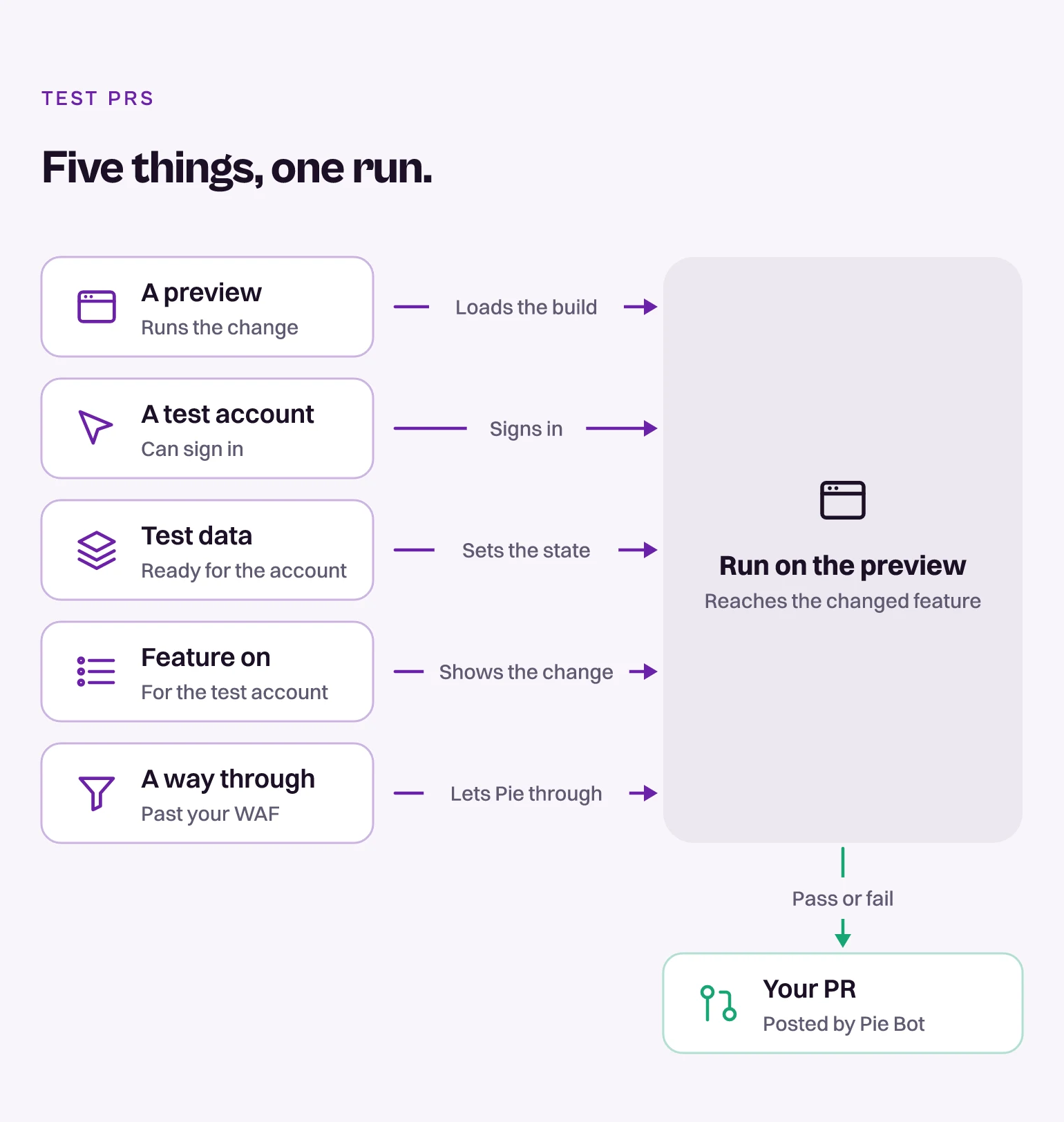
Pie runs next to the stages you already have and leaves them in place.
Make Quality a Continuous Signal
Continuous testing puts quality in the pipeline, on every change, behind a gate that means something. Done well, a team ships several times a day without holding its breath.
The practice lasts only as long as the suite does. A suite nobody trusts is worse than no suite, because the gate keeps saying yes.
A green build should be worth believing.
Keep Your Gate Worth Trusting
Pie writes the tests from what your app does, with no locators to break.
Frequently Asked Questions
Spent a decade in B2B SaaS sales before building Pie. Now obsessed with helping engineering teams ship without the fear of breaking things. LinkedIn →