What Is Regression Testing? Types, Examples, and When to Run It
Regression testing guides list up to a dozen types and leave you to choose. Here are the three questions behind the names and the run to pick for each change.

You shorten the session timeout on Tuesday. By Thursday, support is forwarding screenshots of a checkout button that spins forever for anyone who has been signed in for an hour. Nobody touched checkout. The change was safe where it was made and wrong where it landed.
Regression testing is how you find that out on Tuesday. The skill that matters is deciding what to re-run on each change, and this guide turns the long list of types into that decision for a pull request and for a release.
What you’ll learn
- What regression testing is and how it differs from retesting
- The three questions behind the seven names for regression test types
- What to re-run on a pull request, a merge, a nightly build and a release
- What to automate, what to keep manual, and where autonomous testing fits
What Is Regression Testing?
Regression testing is re-running tests you already have after a change, to catch what the change broke in parts of the product it was never meant to touch. The ISTQB glossary describes it as change-related testing that looks for defects introduced or uncovered in unchanged areas.
A regression is the bug it hunts, meaning a feature that worked yesterday and doesn’t today. The new feature itself is not the target. Tests for the new feature ask whether the thing you built works, and regression tests ask whether everything else does too.
The term people confuse it with is retesting, which ISTQB also calls confirmation testing. The two run in sequence after a fix and answer different questions.
| Retesting | Regression Testing | |
|---|---|---|
| Question | Is this bug fixed? | What else did the change break? |
| Tests run | The exact case that failed | Cases in areas the change should not have touched |
| Size | One case | A chosen set, from a handful to a full suite |
Run the retest first. There is no point checking the neighbors of a fix that didn’t work. Smoke testing, sanity testing and unit testing get mixed up with regression testing too, and each answers a narrower question.
| Check | The Question It Answers | Where It Sits |
|---|---|---|
| Smoke testing | Is this build stable enough to test at all? | First, on every new build |
| Sanity testing | Does the area I just changed behave sensibly? | A quick pass before deeper work |
| Unit testing | Does this piece of code do what it should? | While writing, and on every commit |
| Regression testing | What else did the change break? | After a change, at the scope you choose |
A Regression Test in Practice
Take the timeout as a worked example. The change lived in session handling and the failure showed up in checkout, so the test that catches it is neither a login test nor a payment test. It is a flow that crosses both.
- Sign in: Start a normal session.
- Age the session: Move the clock past the new timeout.
- Add an item: Put something in the cart.
- Pay: Complete checkout.
- Expect: The payment goes through, or the app asks the user to sign in again and keeps the cart. A spinner fails the test.
Someone writes that test once, after the Thursday screenshots. From then on it runs after any change that touches sessions or the cart, and the next person to shorten a timeout hears about it from a failed build instead of from support.
Why a Regression Costs More Than a New Bug
A bug in a new feature meets only the people who have tried it so far, and a regression meets everyone who already relied on the old behavior. The more often you ship, the more chances one has to get through, and the less time anyone has to check by hand.
Software is interconnected, so a change in one place has consequences in places its author never read. Martin Fowler’s writing on self-testing code argues that a test suite is valuable for the confidence it gives you to change the system. Confidence is what lets a team make a bigger change on a Friday. Without it, teams either slow down or ship and hope, and both cost more than the suite did.
Types of Regression Testing: Seven Names, Three Questions
Guides list anywhere from two types of regression testing to a dozen, and the lists disagree because the names answer three different questions. Sort the names by the question and the list stops being a list.
| The Question | Names You’ll See | What They Mean |
|---|---|---|
| How much do you re-run? | Retest-all, complete, selective (regional), partial | Retest-all and complete run everything, with complete usually saved for a release or a core change. Selective, regional and partial run only the tests near the change. |
| Which tests do you run? | Corrective, progressive | Corrective reuses the existing tests because the specification didn’t change. Progressive adds new tests because it did. |
| At what level? | Unit | Unit regression re-runs one unit’s tests with its dependencies stubbed, before the pieces are combined. |
The level changes what a run costs and what it can see. Ask which level could have caught the checkout failure from the opening.
- Unit: Fast enough to run on every commit, and blind to anything outside the one piece of code. It cannot see the checkout failure.
- Integration: Checks that components still agree with each other, which is where a changed interface shows up.
- System: Drives the product the way a user does. It is the slowest level per test and the level that sees a session timeout break a payment.
Two names on longer lists sort differently. Visual and non-functional regression change what a test checks, such as how a screen looks or how fast it responds, and not the scope, the test choice or the level. They run as separate suites alongside this one.
A retail company’s QA team described their setup to us. Their regression suite was split by module. Their smoke suite was a smaller version of it, and on Saturdays they kicked off an on-demand health check. No type from a glossary appears anywhere in that setup, only a scope for each trigger.
Teams don’t pick one type. They answer each question for each change, and a fourth question, who does the running, is the last section here.
Stop Hand-Running the Same Flows
Give Pie the flows you re-click by hand. It starts the run for you.
What to Re-run on Each Change
What you re-run on a given change depends on what the change can reach and how long anyone will wait to find out. Two techniques do the work.
- Regression test selection: Runs only the tests a change can affect, found by mapping which tests exercise which code.
- Test prioritization: Keeps the full set but reorders it so the likeliest failures come first, which shortens the wait for bad news and leaves the total runtime alone.
Google runs selection at a scale few teams need. In Software Engineering at Google, the chapter on continuous integration says its test system handles more than 50,000 unique changes a day and runs more than four billion test cases. It decides what to run by analyzing the downstream dependency graph of each change. Selection is only as safe as that map.
Suppose the sign-in-then-pay test from earlier is already in the suite when the next timeout change lands. The same change gets three different outcomes depending on the scope you chose.
| Scope You Chose | What Runs | Catches the Checkout Failure? |
|---|---|---|
| Selective, by changed files | Tests mapped to the session code | Only if the sign-in-then-pay test is mapped to that code |
| Selective, by critical flow | Sign-in, checkout and the other money paths | Yes |
| Complete | The entire suite | Yes, after the suite’s full runtime |
The scope usually lines up with the trigger like this. Treat it as a default, because a risky change earns a wider run than its trigger says.
| Trigger | Scope | Why |
|---|---|---|
| Pull request | Selective, the flows nearest the diff | Fast enough that the author hasn’t moved on |
| Merge to main | Broader, every critical-path flow | Catches what two separate pull requests did to each other |
| Nightly | The entire suite, if it finishes overnight | Duration matters less than having a result by morning |
| Release candidate | The entire suite, plus a person on anything a script can’t judge | The last point where a regression is cheap to fix |
| Dependency, config or environment change | Corrective, the existing tests and no new ones | Nothing in your code changed, so the risk is the ground under it |
The last row is easy to forget. When a test environment drifts away from production, a green run from last week tells you less than it did. On mobile the change that breaks things is often not yours at all. A new OS release or a different screen size is enough, so mobile regression testing has failure modes of its own.
Why Narrow Beats Complete on a Pull Request
Look, a narrow run you actually wait for beats a complete run you skip. Run the narrowest scope that could catch the change’s side effects on every pull request, and run the whole regression suite before a release.
The objection is that narrow is unsafe, and it has a point. A side effect outside your map gets through until the wider run at merge or release catches it. But a run nobody waits for is less safe, because skipping is a cost decision. A run that costs more minutes than the change looks risky gets bypassed, and every regression ships inside a change that looked safe.
A skipped run protects nothing.
A seatbelt is the right comparison. You don’t judge one by how many crashes it has stopped. It works because it gets worn on every drive, and it gets worn because buckling costs almost nothing. A run that comes back after the author has moved on gets skipped the first hurried Friday. So does a flaky test that teaches the team to read red as noise.
What a Green Run Does Not Prove
A passing run proves only that the checks you wrote passed. It says nothing about the checks you never wrote, and a suite can stay green while a screen is visibly broken, because every assertion looked somewhere else. A suite guards only what someone once thought to ask. The bugs outside that list belong to exploratory testing, which is a different discipline with a different payoff.
Where the tests come from is a separate job. Choosing the cases and structuring them is what building a regression test suite covers.
Manual, Automated, and Autonomous Regression Testing
Regression tests are the strongest candidates for automation, because the same checks run on every change and the expected result rarely moves. The real decision is who keeps the automation alive.
A person re-clicking the same paths by hand is slow, and it is the first thing dropped under deadline. What stays manual is whatever a script can’t judge, such as a feature in design or the call on whether a flow feels broken even though every assertion passed. If you’ve decided to automate regression testing, the five steps in that guide are the next read. The choice has three options, and they differ in who does the upkeep.
| Dimension | Manual | Scripted Automation | Autonomous (Pie) |
|---|---|---|---|
| Who writes the tests | A tester, as a checklist | An engineer, in code | Pie drafts them, from a plain-English description or its own discovery of the app |
| What a UI change does | A person adapts on the spot | Steps bound to selectors break until someone fixes them | Supported tests have no locators to break |
| Cadence | Once per release cycle, if at all | Every pull request, if the suite is fast | On a schedule or a new build, once configured |
| Best fit | Judgment calls and new features | Stable UIs with engineers to spare | Fast-changing apps with no team to maintain scripts |
Scripted automation has an upkeep problem built in. Whenever a UI change moves or renames an element, its selector breaks, and someone has to find which tests that broke before the suite means anything again. Self-healing test automation goes after that repair work, with tests meant to survive a UI change.
Which product to buy is a separate question. The ten regression testing tools we compared are sorted by the way suites fail rather than by feature count.
Let Pie Start Every Regression Run
The trigger table only protects you if something starts the run every time. Pie can own that step, so the scope you chose for each trigger runs without anyone remembering to run it.
- Schedule it: Put the suite on a Loop, Pie’s saved set of suites and triggers, and pick a nightly or weekday time. The nightly row of the table then needs nobody to start it.
- Start it from CI: A CI job on each merge starts the Loop with one request. For a mobile app, the job sends the build along with it.
- Test the pull request: Comment
@pie-pr-bot teston GitHub or/pieon GitLab to run Pie against the change. A web app needs a preview URL for the pull request, and a mobile app needs an uploaded build. - Fix what fails: Results land in Run History for each suite, and failures group into issues. Press Fix and Pie opens a Fix PR in a repository you connect, and merging stays your team’s call. Or send the issue to Jira, Linear or Asana.
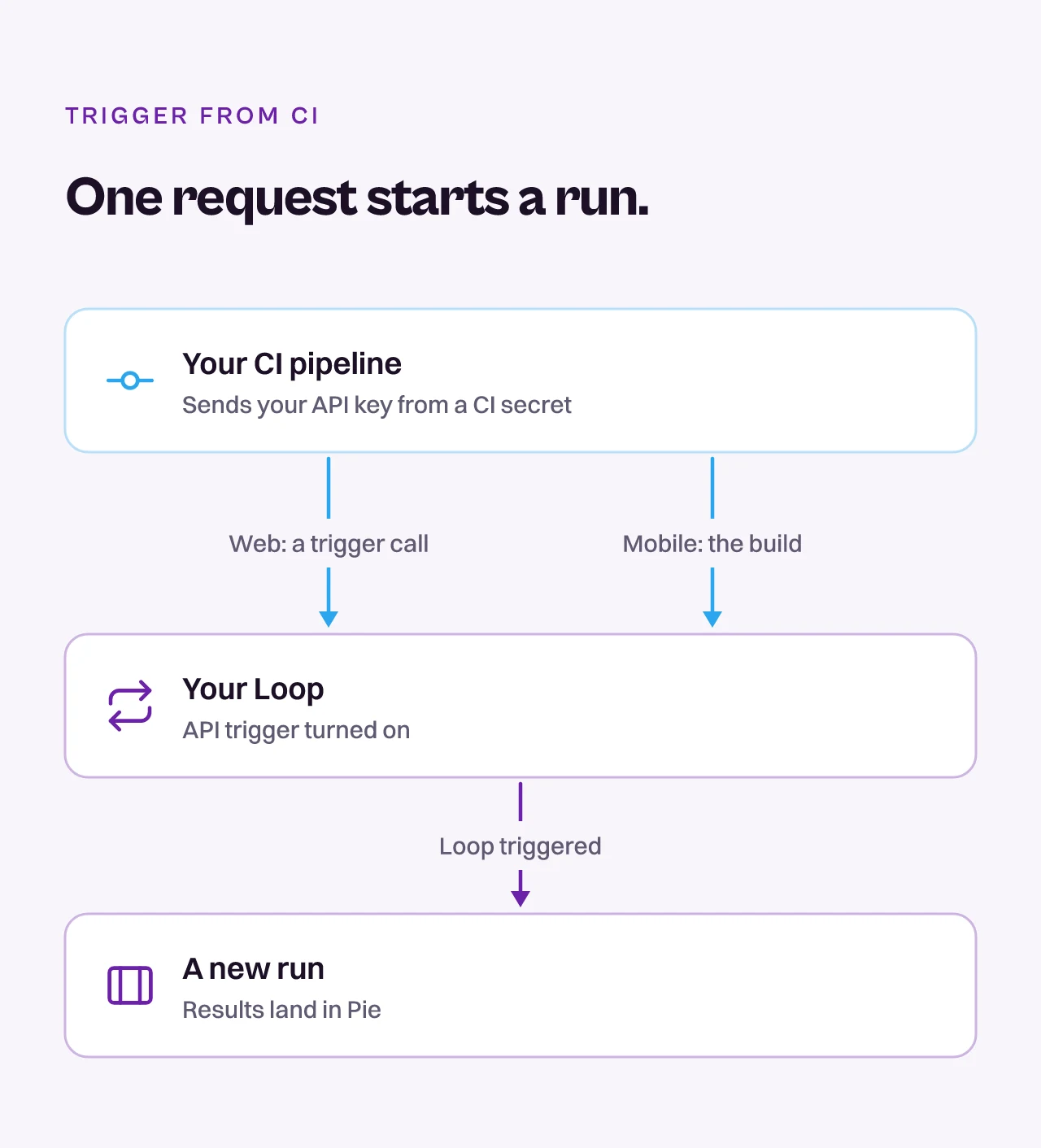
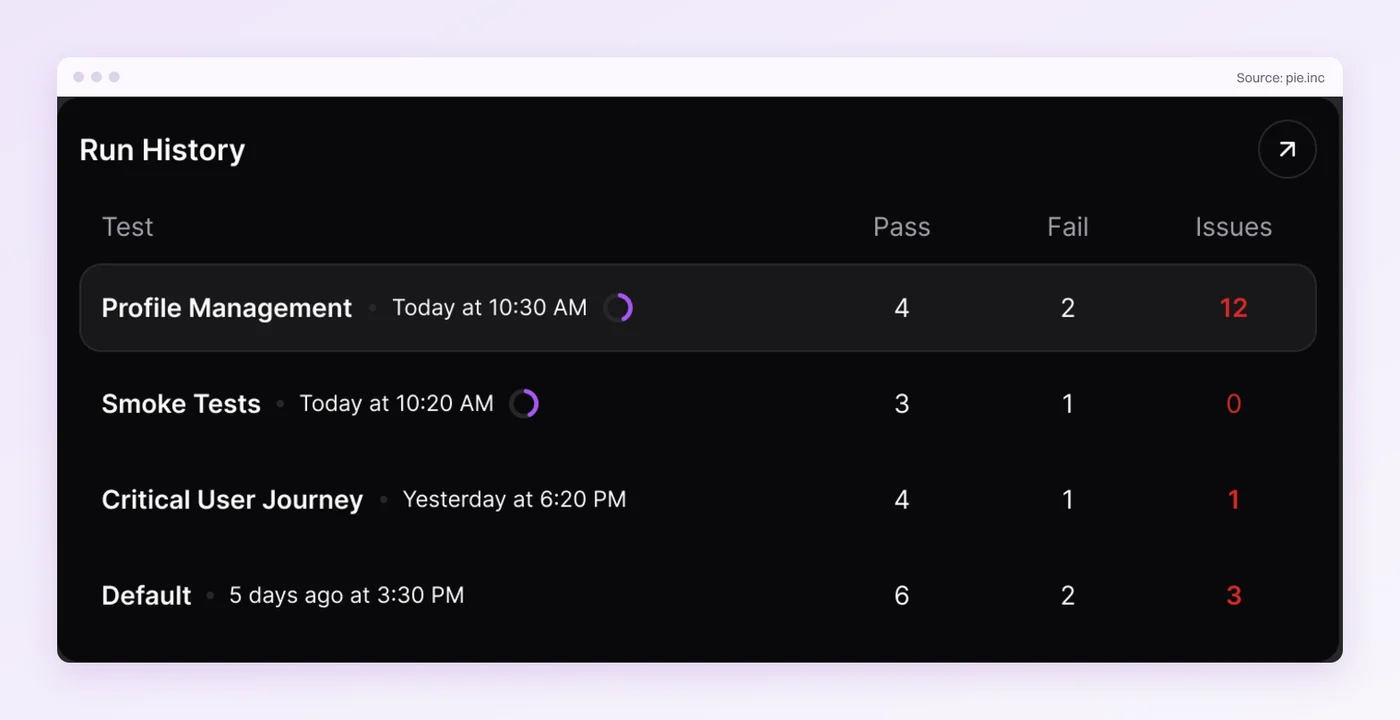
Flows that need code-level control stay in your own framework, and the calls a script can’t judge stay with your testers.
Find the Regression on Tuesday, Not Thursday
Your regression suite is a promise that the parts of your product you didn’t touch still work. The promise breaks on cost. A suite that takes longer than anyone will wait gets skipped, and then the Thursday screenshot arrives.
Runtime is one cost and upkeep is the other. A suite nobody keeps up stops matching the product.
Pick the smallest run that could catch your next change. Run it every time. Run all of it before you ship.
Test the Flow That Breaks Most
Bring the flow you re-check every release. Watch Pie run it.
Frequently Asked Questions
13 years building mobile infrastructure at Square, Facebook, and Instacart. Now building the QA platform he wished existed the whole time. LinkedIn →